BUY NOW
](https://hubspot-no-cache-na2-prod.s3.amazonaws.com/cta/default/51325885/interactive-382152027853.png)](https://shotpattern.app/hs/cta/wi/redirect?encryptedPayload=AVxigLKhuwkvsLaohq75p%2BDuqtziQhQDGpoYYVY%2B%2FvDpqaSrfdg19FDRnBUWZ4DWo%2BJYVjCfIOd20Mzj%2FgOCiX45d2MU%2BT%2BmvM8ejTMtgjLTdGmU62yW8Z7ZlZLtBKAn3MDILX0HDDLzWORJ4TsPS4pQcizcJ4aOB2xCgkLztltpKlC3%2BgLbjl9UiFY%3D&webInteractiveContentId=382152027853&portalId=51325885)  # Why You Should Review Your Golf Stats Like a Basketball Coach  Eric Duffett June 4, 2026 Most golfers finish a round with a general feeling about how it went. You know you hit a couple bad drives. You know you three putted 16. You probably have an opinion about which part of your game let you down. The problem is that feelings and reality often disagree. Before I got into golf analytics, I was a basketball coach, and reviewing game film was my obsession. Most teams pour all their video time into scouting the opponent. In Shot Pattern terms, [that's the course preview](https://shotpattern.app/blog/4-things-to-check-in-3d-course-preview), i.e. studying an upcoming course before you play it. That work matters. But it's not where the real gold is. That's in what coaches call the “self scout”. You turn the camera around and study yourself. Your breakdowns, your weaknesses. The things you keep getting wrong without realizing it. I'd watch our games three or four times, often three seconds at a time, and fill notebooks with everything we needed to clean up. Then came the part that actually mattered: deciding which mistakes to spend time on. People don’t realize how little time a coach actually has. You can’t fix everything before the next game. So the entire job comes down to one question: of all the things we could work on, which one will pay off the most? You find that by reviewing the tape. Not by going off how the game felt. Golf is no different, and I review every round I play in Shot Pattern. Your round is the tape, and your strokes gained data is the self scout. The process is the same one I used in a film room for years: find the lowest hanging fruit. The hard part isn't the process. The hard part is accepting that the data might disagree with what you felt on the course That disconnect is the whole reason this process matters. If you’re going to spend time practicing, you want to practice the right things. **Your gut feeling after 18 holes is not a reliable guide.** The best way to review your round is to look at your strokes gained totals across four categories, find the one that cost you the most, and go shot by shot to find the specific shots that did the damage. Here's the process I go through after every round. ## **Start with the Big Picture** Open your round summary and look at your [strokes gained](https://shotpattern.app/blog/what-is-strokes-gained) totals across the four main categories: tee shots, approach, short game, and putting. 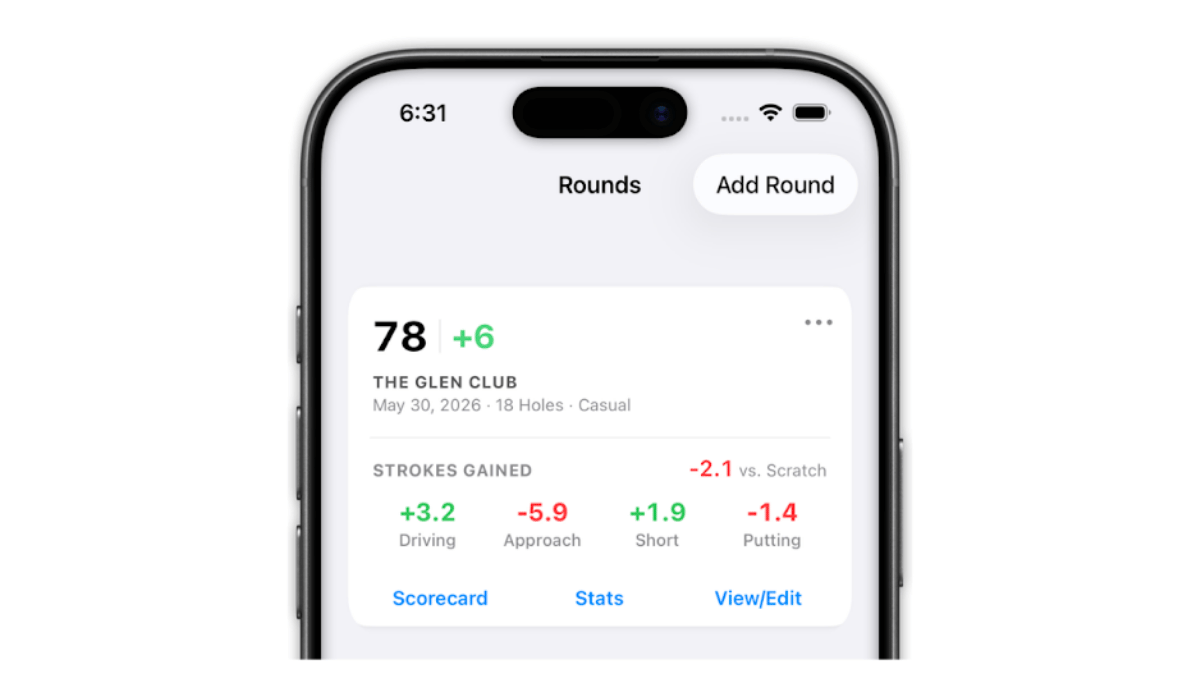Each category tells you whether you gained or lost strokes relative to your target handicap benchmark. The first thing I look for is which category was my biggest loser. Not by feel. By the numbers. This is where strokes gained earns its reputation as a better performance indicator than traditional stats. Fairways hit doesn't tell you whether the fairways you missed cost you half a stroke or two strokes. Total putts doesn't account for whether you were putting from 4 feet or 40. Strokes gained does. If you want a deeper explanation of how strokes gained works and why it matters, we break that down [here](https://shotpattern.app/blog/what-is-strokes-gained). The categories that drove the score might not match how you felt during the round. That's not a flaw in the data. That's the data doing its job. One thing worth checking before you go further: make sure your target handicap benchmark is set to something that reflects your actual playing level. If you're measuring yourself against the wrong standard, the numbers lose their meaning. ## **Drill Into the Worst Category, Shot by Shot** Once you've identified your weakest area, go into the shot-by-shot detail for that category. I start by looking at it in a hole-by-hole sequence. This gives me context. I can see the round unfold and remember the situations I was in, what the wind was doing, what I was thinking over the ball. Then I toggle the sort from worst to best. That's when the real picture shows up. 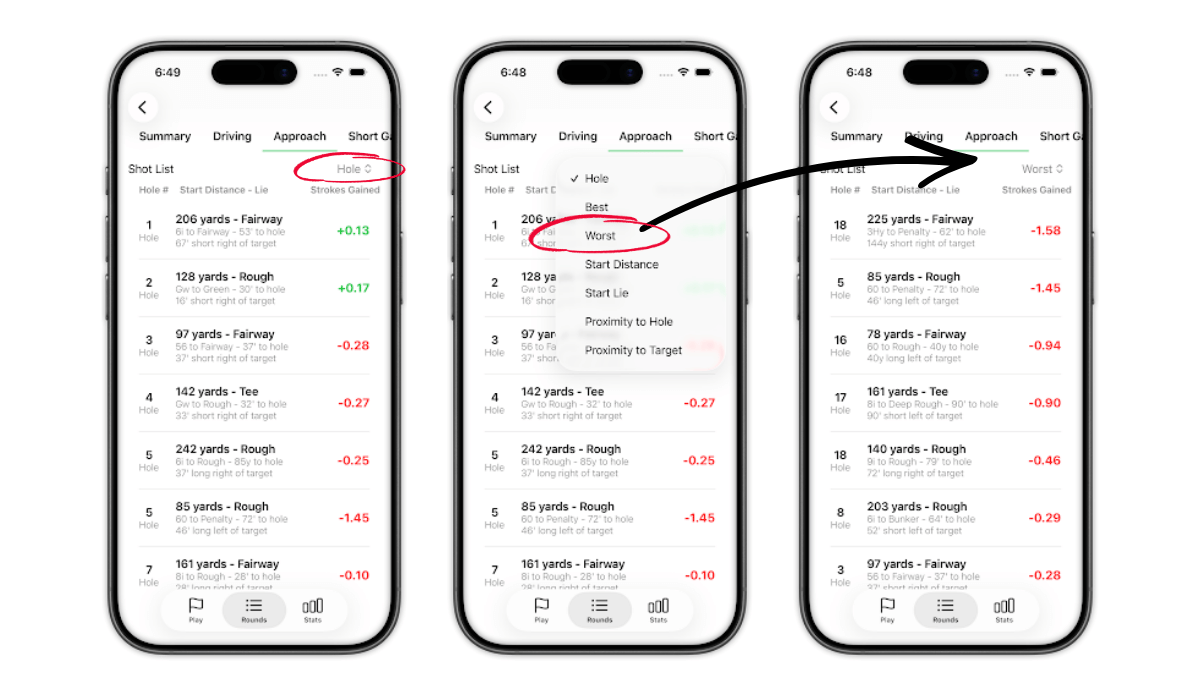Sorting from worst to best surfaces the shots that did the most damage. You're not examining every shot in the category. You're looking for the three to five shots that cost you the most strokes. In most rounds, a handful of shots account for the majority of the damage in your worst category. Finding them is the entire point of this exercise. [Here's what that process looked like](https://shotpattern.app/blog/least-valuable-yards-golf)when I found a flat spot in my proximity data ## **Clean Up Your Data** Before you draw any conclusions from your worst shots, take 30 seconds to check that the lie tags are correct. The most common tagging error I see is recovery shots getting marked as shots from the rough. This matters more than you'd expect. The expected strokes to hole out from a recovery lie and the expected strokes from the rough are drastically different numbers. If the app thinks you were sitting in the rough when you were actually behind a tree punching out sideways, the strokes gained calculation for that shot is going to be way off. 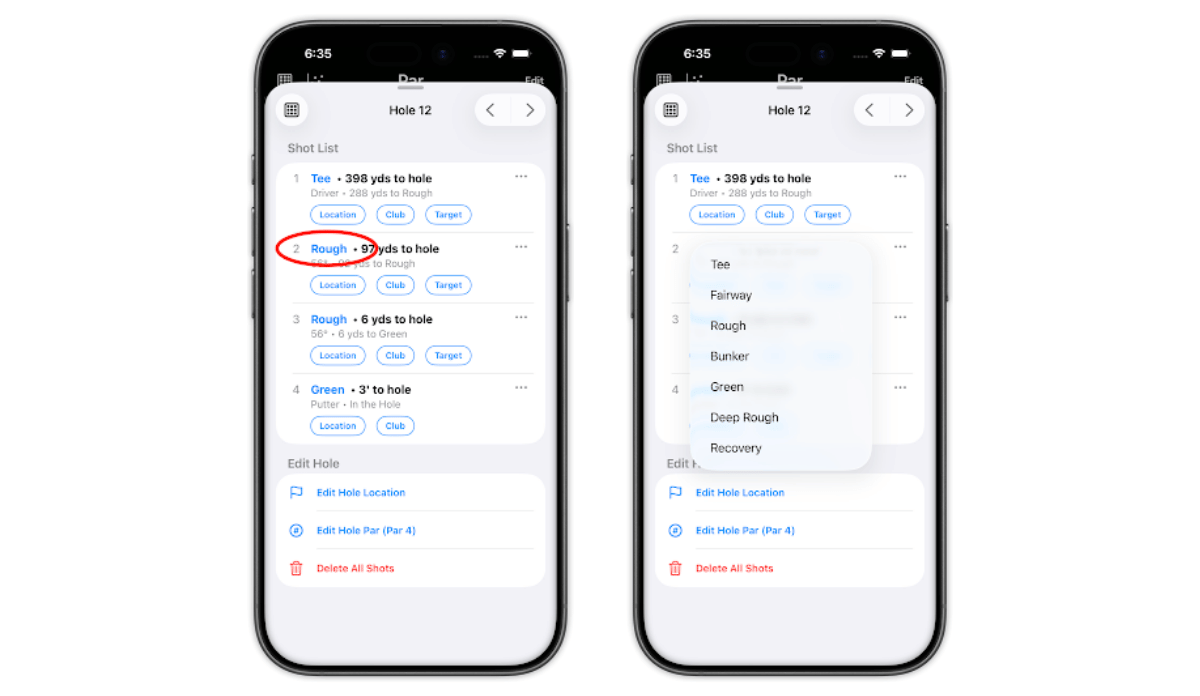If you spot a mismatch, open the edit view and toggle the start lie. The math recalculates on the spot. It takes a few seconds, and it can completely change what the data tells you about that shot. This step isn't the exciting part of reviewing your round. But skipping it means you might spend your next practice session working on the wrong thing because of a tagging error. I check lie tags on every single round I review. ## **Ask What Went Wrong** Now you're looking at three to five shots that actually cost you strokes. For each one, the question is: what went wrong? I sort these into four buckets. **A skill issue** means the swing failed in a predictable way. You had the right plan, you aimed at the right target, and the ball just didn't go where you intended. This is where seeing trends helps us practice on the right thing. **A strategy issue** means you chose the wrong target, the wrong club, or took on too much risk given the situation. The swing might have been fine. The decision wasn't. **A mental or process issue** means something in your routine or focus broke down. You rushed a shot. You let the previous hole follow you to the tee. You didn't fully commit before pulling the trigger. **And sometimes it's just a hard shot.** The lie was terrible, the wind gusted, the pin was tucked with no margin for error. Not every bad outcome is a mistake. This is where the review stops being about numbers and starts being about understanding. The fix for a skill issue is practice. The fix for a strategy issue is a better game plan. The fix for a mental issue is a better routine. And hard shots? You tip your cap and move on. Each of these four buckets has specific criteria and benchmarks that vary by handicap level. I go deep on all of them, including how to tell whether a shot belongs in one bucket or another, in a separate post [here](https://shotpattern.app/blog/skill-vs-strategy). If you want the full diagnostic framework, that's the place to start. ## Turn it Into Practice The whole point of reviewing your stats is to walk away with something you can act on. Practice time is limited for almost all of us. You're probably not going to the range five days a week. So when you do practice, you want that time pointed at the specific things that cost you strokes in your last round, not a generic warmup routine or whatever drill you saw on Instagram. If your review shows that three of your five worst shots were approach shots from 150 to 175 yards that missed the green right, that's your practice focus. If it shows two penalty strokes off the tee on holes where a 3 wood would have kept the ball in play, that's a strategy adjustment you can make without hitting a single ball. Let the data from your last round direct the work you do before your next one. That's the loop. Review, diagnose, practice, play. The golfers who close that loop consistently are the ones who improve. [**Get Your 7 Day Free Trial of Shot Pattern**](https://shotpattern.app/blog/what-is-strokes-gained) --- ## Frequently Asked Questions What is the best way to analyze a round of golf? Start with your strokes gained totals across the four major categories: tee shots, approach, short game, and putting. Identify the category where you lost the most strokes, then drill into the shot by shot detail to find the three to five most costly individual shots. Check your lie tags for accuracy, then sort each bad shot into one of four buckets: skill, strategy, mental, or hard shot. That diagnosis tells you what to work on before your next round. Should I use strokes gained or traditional stats to review my round? Strokes gained. Traditional stats like fairways hit and total putts lack context. Fairways hit treats every miss the same whether you ended up in the first cut or in the water. Total putts doesn't account for whether you were putting from 4 feet or 40. Strokes gained measures performance relative to the difficulty of each shot, which means it tells you where you actually gained and lost ground. It's a more complete picture of your round than any box score stat can give you. How do I know which part of my game to practice after a round? Review your strokes gained by category and find the area where you lost the most strokes. Then look at the individual shots within that category to see if there's a pattern. If you lost strokes on three approach shots from similar distances, that's your practice target. If two of your worst shots were strategy mistakes, no amount of range time fixes that. The type of mistake determines the type of work. What strokes gained categories should I look at after a round? The four main categories are tee shots (driving), approach (shots into the green from outside 50 yards), short game (chips, pitches, and bunker shots), and putting. Looking at all four gives you a complete picture of where strokes were gained and lost. Most golfers find that one or two categories account for the majority of their scoring damage on any given day. Why do my strokes gained numbers seem wrong? The most common reason is incorrect lie tags. If a recovery shot is tagged as a shot from the rough, the expected strokes baseline is wrong and the strokes gained math is off. Check that the start lie and end lie of each shot match what actually happened on the course. Also confirm that your target handicap benchmark is set to your actual playing level rather than the default. What is the difference between a skill issue and a strategy issue in golf? A skill issue means you had the right plan but the execution failed. You aimed at the right target and the ball didn't go there. A strategy issue means the plan itself was flawed. You chose the wrong club, aimed at the wrong target, or took on more risk than the situation called for. The distinction matters because the solutions are completely different. Skill issues are solved with practice. Strategy issues are solved with better decision making, which starts with understanding your actual shot dispersion and playing to your real pattern rather than the one you imagine you have. ## Share this post