
The difference between a good tournament round and a frustrating one usually comes down to what you did before you teed off.
A solid game plan covers four things: your conditions, your tee shots, your approach shots, and your green reads.
Do that work ahead of time and you spend tournament day playing golf instead of solving problems on the fly.
Here's the framework I use, and the one I recommend to every competitive golfer I work with.
Know Your Conditions Before You Open the App
This part sounds obvious, but it matters. Know your course, the tees you're playing, the yardage hole by hole if you can get it, and your tee time.
If you're playing a mixed set of tees, pick the set that most closely matches your overall yardage and plan to adjust on a hole by hole basis once you're previewing individual holes.
The piece most golfers skip is wind. Not just the general forecast for the day, but wind speed, strength, and direction at the time you'll actually be standing on each hole. Morning tee times and afternoon tee times can play like completely different courses.
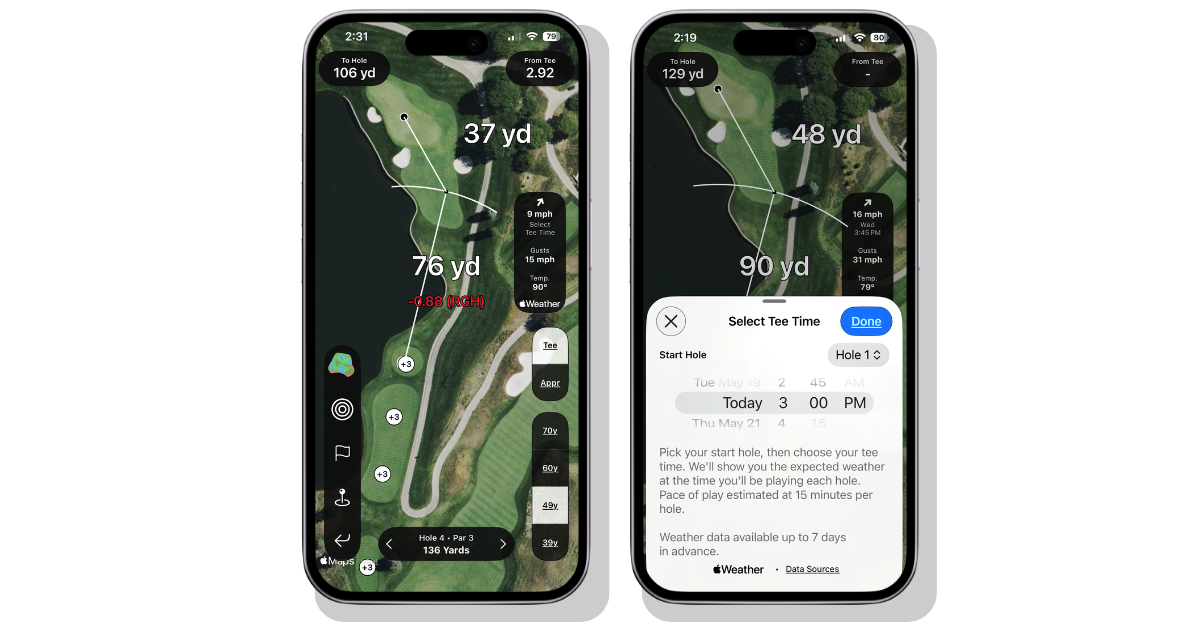
In Shot Pattern, you can tap the wind meter to expand it, select your tee time and starting hole, and get a sense of what you'll face on every hole at the time you'll be there. That level of specificity changes how you plan.
Here's that feature in action, all done via Course Preview in Shot Pattern:
Plan Your Tee Shots Around One Priority: Avoiding Penalty Strokes
This is the most important section. Off the tee, the number one goal is giving yourself the best chance to keep penalty strokes off the card. Not maximizing distance. Not chasing the perfect position. Removing the big number from the equation.
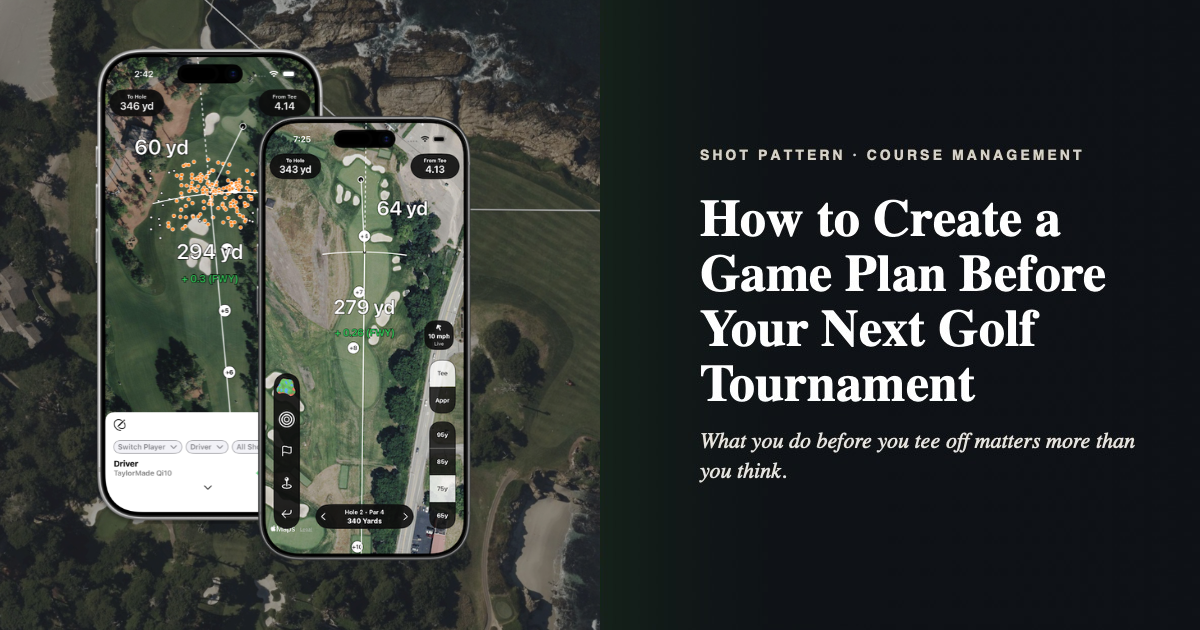
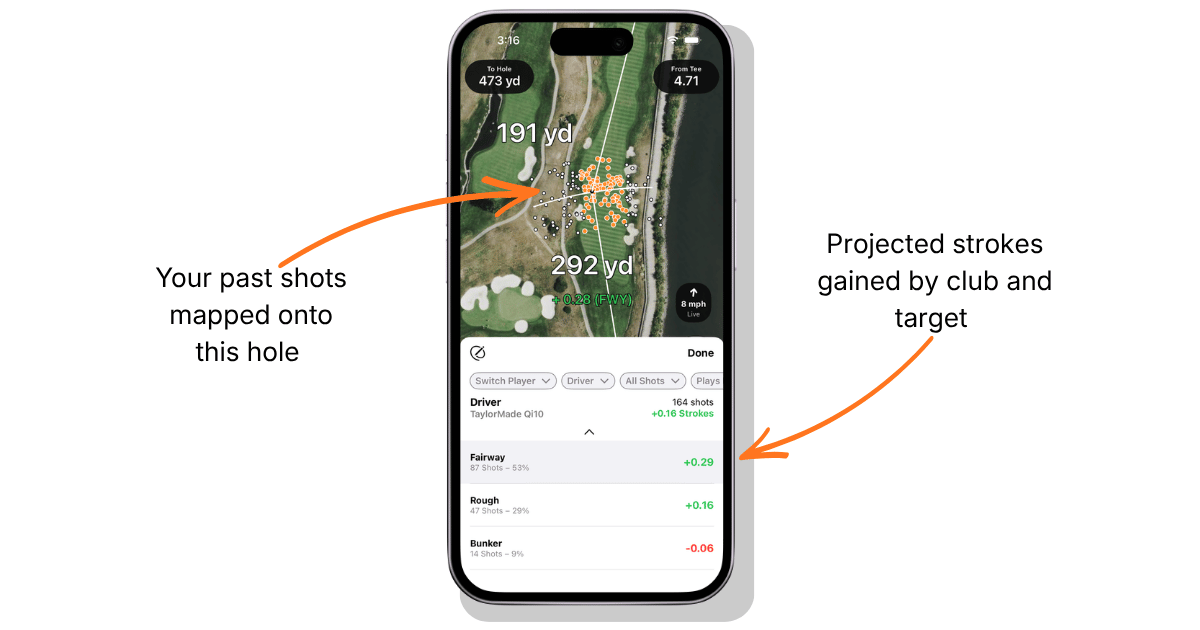
If you've been using Shot Pattern the way it's intended, you already know the size of your dispersion off the tee. Now you just need to find the target that gives you the most margin for error without sacrificing so much distance that you're left with a long iron or more into the green. On most holes, the arcs give you a quick visual of where that target is.
Some holes require a deeper look. That's where the Strokes Gained Predictor comes in. It lets you overlay your actual shot data onto the hole you're studying and see how the expected strokes gained value shifts as you move your target and change clubs.
We put together a full tutorial on YouTube if you want to go deep on how to use it, but the core principle is simple: compare your options using real data, not guesswork:
Here's the philosophy I come back to over and over…
When two clubs show essentially the same expected score, choose the less volatile option. Keeping the momentum of a round by avoiding blow ups is more valuable than chasing birdies. When given two equal options, I'll opt for bogey avoidance every time.
And, again, don't forget to factor in conditions.
Use the wind meter to adjust your plan for each tee shot. If you're using the Strokes Gained Predictor, you can adjust the "plays as" value up or down to account for the wind you'll face that day. And pay attention to elevation. Shot Pattern's elevation markers show you the elevation change from where the marker sits to the center of the green. A negative number means downhill. A positive number means uphill.
Being able to piece together these variables yourself is part of the point, and I'll explain why in a moment.
Plan Your Tee Shots Around One Priority: Avoiding Penalty Strokes
After tee shots, the next layer of your game plan is understanding what you'll face on approach. For each hole, you want to answer five questions: What club can I expect to hit in? Which direction will the wind be blowing? Where are the likely hole locations? How aggressive can I get? And most importantly, where are the places I really do not want to miss?
To do this well, take advantage of Shot Pattern's green books. They give you the detail you need to answer these questions before you ever set foot on the course.
For pin locations, remember that holes are usually placed on a 1 to 3% slope. Anything placed on a 4% slope is generally considered improperly placed. On some greens, you'll find there are only a handful of spots where a pin can realistically go. On flatter greens it's more ambiguous, but in those cases it's also less critical to pinpoint the location, because the consequences of a miss are less severe.
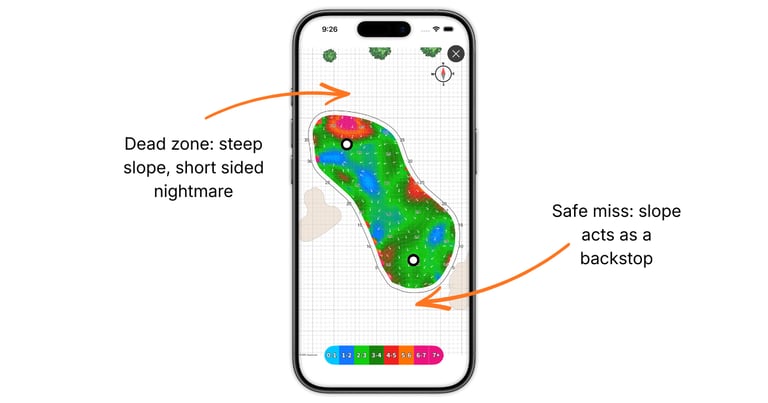
What you're really looking for are the dead zones. These are spots around the green where an up and down becomes tremendously difficult because you have a steep slope running away from you to a short sided pin. When you identify those zones, the game plan writes itself: do not miss on the short side.
On the other hand, if a short sided miss means chipping back up the hill with the slope acting as a backstop, that's a spot where you can afford to be more aggressive. The chip is easier, and the alternative, a long lag putt running down that same hill, might actually be the harder play.
Image example below (taken using Shot Pattern's Green Maps feature):
Doing this mental rehearsal ahead of time means you'll recognize the situation faster and make a better decision when it comes up.
What You Can Actually Use During a Tournament
This is a point of confusion for a lot of golfers, so let's be clear about it.
The following Shot Pattern features are permitted under USGA and R&A rules for tournament play: GPS yardages, tee arcs, approach circles, the wind meter, and green books. That's the core of what Shot Pattern does.
The one thing you lose access to during competition is the strokes gained values. That's by design.
We built Shot Pattern around the rules of golf specifically so you don't become dependent on a feature that gets taken away when the stakes are highest.
We want this to be the most powerful tournament legal tool in your bag, not a crutch that props you up until it matters most and then disappears.
One more thing worth knowing: receiving a "plays as" number or a recommended club is technically not permitted under the rules. You're not even supposed to use those numbers for rounds that count toward your handicap. That's why being able to read elevation, wind, and conditions on your own matters.
Shot Pattern gives you the information. The decision is always yours.
Your Mental Budget Is Finite. Spend It Wisely.
My friend Jon Sherman at Practical Golf has a concept I think about constantly. He says we all have a mental budget for the number of thoughts and decisions we can put ourselves through during a round. Once that budget is spent, the quality of our decisions drops.
By building a game plan before you play, you're pulling the predictable decisions out of your round and handling them when you're calm, focused, and have time to think. That leaves more of your mental budget available for the situations you couldn't plan for, the awkward lies, the shifting winds, the moments where the round is on the line and you need to be fully present.
You won't know ahead of time which holes will go according to plan and which ones won't. The game plan handles the ones that do, so you have bandwidth left for the ones that don't.
Your Mental Budget Is Finite. Spend It Wisely.
Shot Pattern's course preview gives you everything you need to go through this process for any course, any time.
Set your tee time, study the holes, check the wind, read the greens, and show up on tournament day with a plan you trust.