---
title: Shot Pattern | Golf GPS App with Course Strategy & Advanced Stats
description: Shot Pattern is the golf GPS app that gives you the data you need to shoot lower scores. Pick smarter targets. Improve faster.
image: https://shotpattern.app/hubfs/Untitled%20(1200%20x%20630%20px)-2.png
---
[Skip to content](https://shotpattern.app#main-content)
[](https://shotpattern.app/)
[How it Works](https://shotpattern.app/features) [Pricing](https://shotpattern.app/pricing) [Blog](https://shotpattern.app/blog)
[](https://shotpattern.app/hs/cta/wi/redirect?encryptedPayload=AVxigLJ1qK6EYCIdfCMR%2BVlfUTOCYrgMy5zjSeTkJtc5ujTLODo6eCD%2BQb00LLt3oEW2o0NsNLVyDSGOEwyNfDmJ8QqMouD2UgE3sJG1uLVzgMz%2BiyhgKqQvjxBOcN3VFxp0P8QVue%2ByL7Ym9M%2B6zg2KvMR%2FMV5OwI0FuNH6XhIK547q2acgww1iqz8QBFPs%2BI2wZWB6PzSsnIVXAvFDqw%3D%3D&webInteractiveContentId=382152027853&portalId=51325885)

The Golf GPS for Data-Driven Golfers
# Turn Your Shot Data Into Lower Scores
Attack smarter with personalized strategy based on your unique shot dispersion. Improve faster with advanced stats on every part of your game.
[](https://shotpattern.app/hs/cta/wi/redirect?encryptedPayload=AVxigLJpxLE9KNtF8Koh31NO%2BBBzdnB63sKheFRO4oQ8OFCnQ77feudN57mSax2WLwXUEnLsCxrbngioMGQdovODu5JpBBIabLOXSMrqj5cdikLYqEIkAVKYzM5cEWASuJSHK5r4rRu%2B%2FNxi8KQA9tHygP4hvtW2%2F6KlPq5QHM7a2VI5Eb73%2FsRTonNI4S2rSyalxA4PUovIJYA2Kdi9GANoQbbpntxuK9gosMf0xsR3dfFC8N%2BlFeKZcQ%3D%3D&webInteractiveContentId=382151508723&portalId=51325885)
[](https://shotpattern.app/hs/cta/wi/redirect?encryptedPayload=AVxigLJMzfhT7TcSa8rfFpTQZKEKIKtQyB92GUY5VmrBQTUX4d%2BIzT0%2BGR0O4DENPhoQt6qKeMcDfvWhoI%2BAksNO%2FiWT%2BarFnkIAGJBIed6t9rVlFRWQxL57fZiisg4fj6ZAnyF5KoOngAd8orkxf30vAr9goxL3T910%2FHFsQersJ%2B%2BCufBWWd17AjOtR7GrrqUUTs%2F%2BqyKXaFVRUDdLCB2YENDV3BpABtWc7oQtLEVAM3yRIfe5KZx2wJVxG5NgOewIwXzwKyjPWyTRBrhOkjsTItvV8hTFfloGPXcpAITB1C4BQ9lNn5raHAQqGdZJvQ5z%2BH3%2B%2Fv0g%2FbFIVZe7sQFjCpZHnHly0ogqQBDCmKDxCPaO8A%3D%3D&webInteractiveContentId=424135045843&portalId=51325885)
Track every shot · No sensors required · Competition-ready Tournament Mode
Shots that cost you most SAMPLE
Hole 3 • Drive 299y Penalty • 23y left of target −0.88
Hole 7 · Pw - 136 yards Rough · 29y to hole −0.64
Hole 4 · Pw - 129 yards Rough · 25y to hole −0.62
Approach from 125–150 is your weakest range →
Choose Smarter Targets
See how your full shot pattern fits the hole.
Diagnose Costly Shots
Go beyond category totals to the shots behind them.
Improve With Purpose
Know what deserves your next practice session.
YOU DESERVE TO PLAY GREAT GOLF
## Stop Scoring Below Your Potential
We can help you avoid disaster shots, learn to how to create your personal plan of attack on any new course you play, and make the most of your practice time.
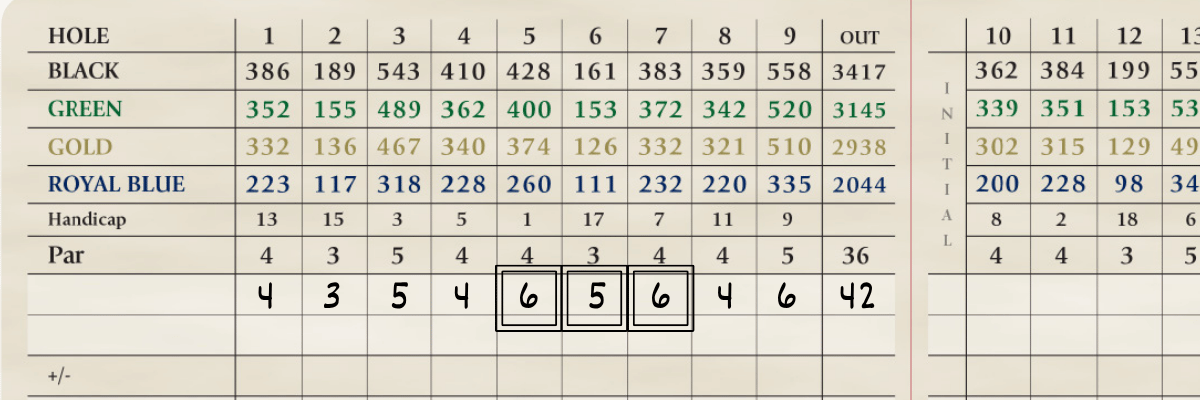
### Take Penalties Out of Play
Blow up holes can wreck a scorecard. We'll help you pick the right targets based on your data so you can keep your round on track.

### Get Your Game to Travel
A lot of golfers can learn to score at their home course, but their game doesn't travel. Shot Pattern's design helps you see and understand how to intelligently attack any new course.
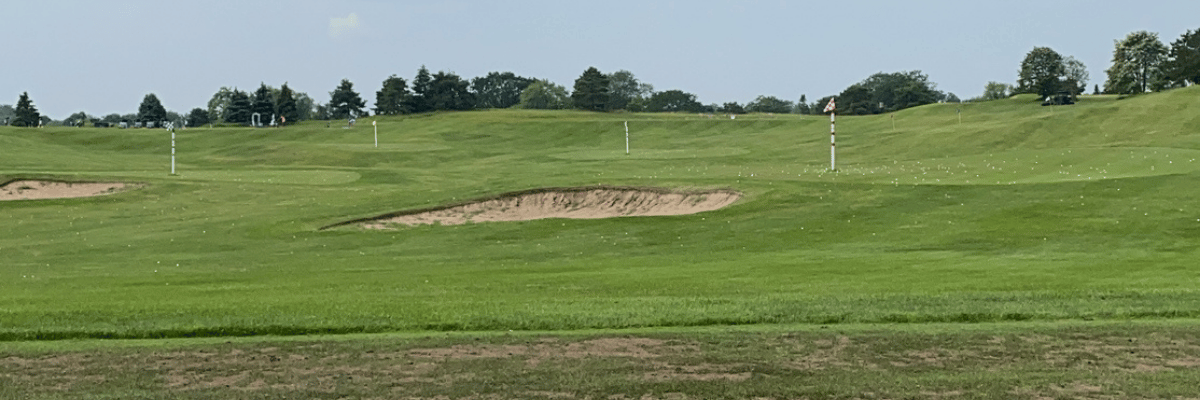
### No More Wasted Practice Time
Most golfers are guessing what to work on, or are just practicing their strengths. We'll help you uncover what actually needs your attention so that you can practice in a way that leads to lower scores.
Study the course. Track your shots. Know what to practice.
## The Data You Need to Prepare, Compete, and Improve
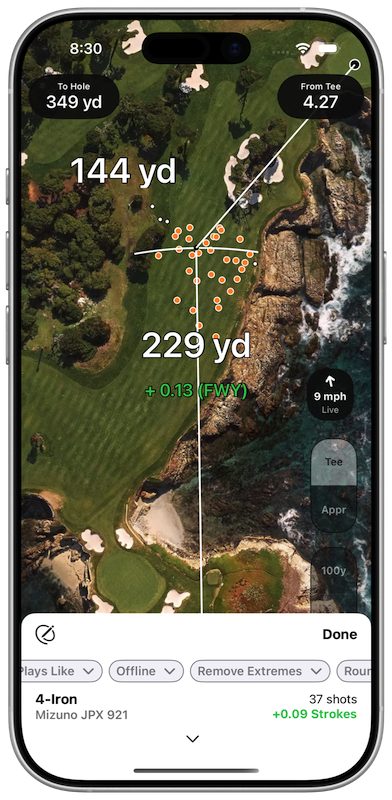
Prepare a game plan in Course Preview. Use it on course like an interactive yardage book with your dispersion mapped on top. Track every shot and use the advanced analytics to know exactly what you need to work on.
Personalized Strategy 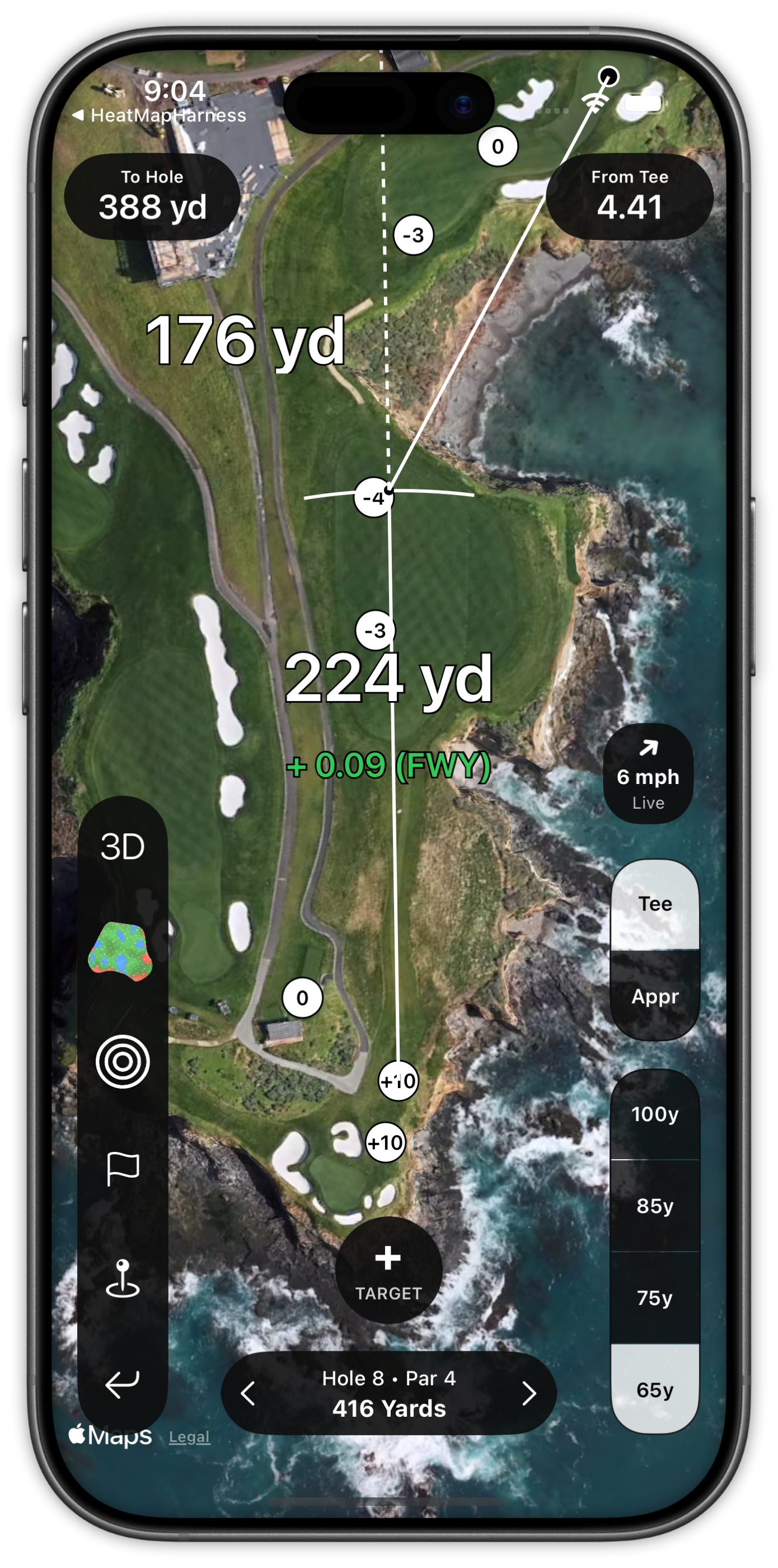
“Where should I aim?”
### Aim for the Pattern—Not the Perfect Shot
Overlay your tee shot and approach dispersion on any hole. Compare clubs, move the aim point, and see how your entire pattern interacts with fairway, rough, bunkers, water, trees, and out of bounds.
Shot by Shot Strokes Gained 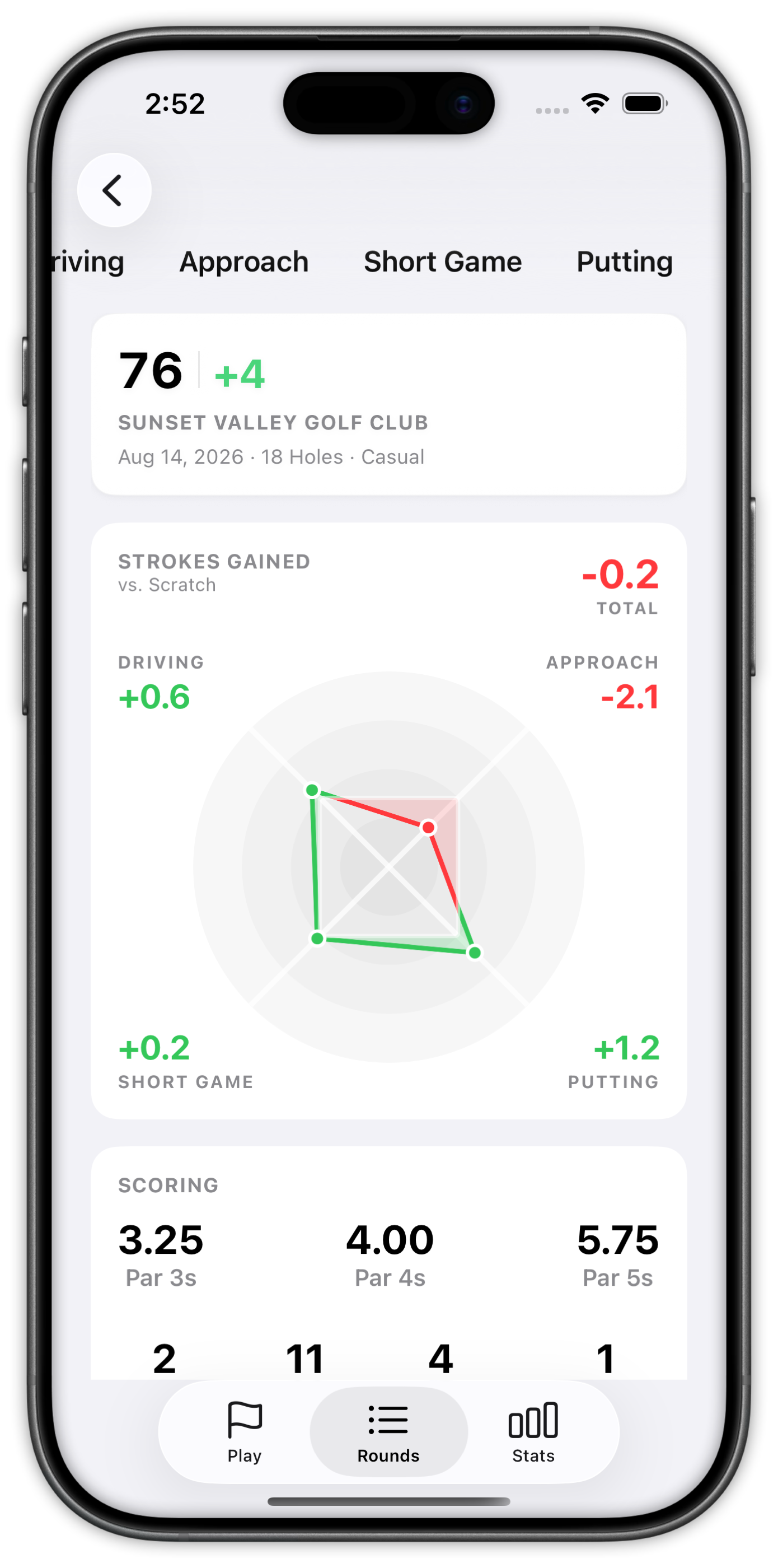
“What actually cost me?”
### Find the Few Shots That Shaped the Round
Track every shot and review strokes gained at the shot level. Surface Score Killers, short-sided approaches, costly distance ranges, dispersion trends, and the individual shots that did the most damage.
Advanced Analytics 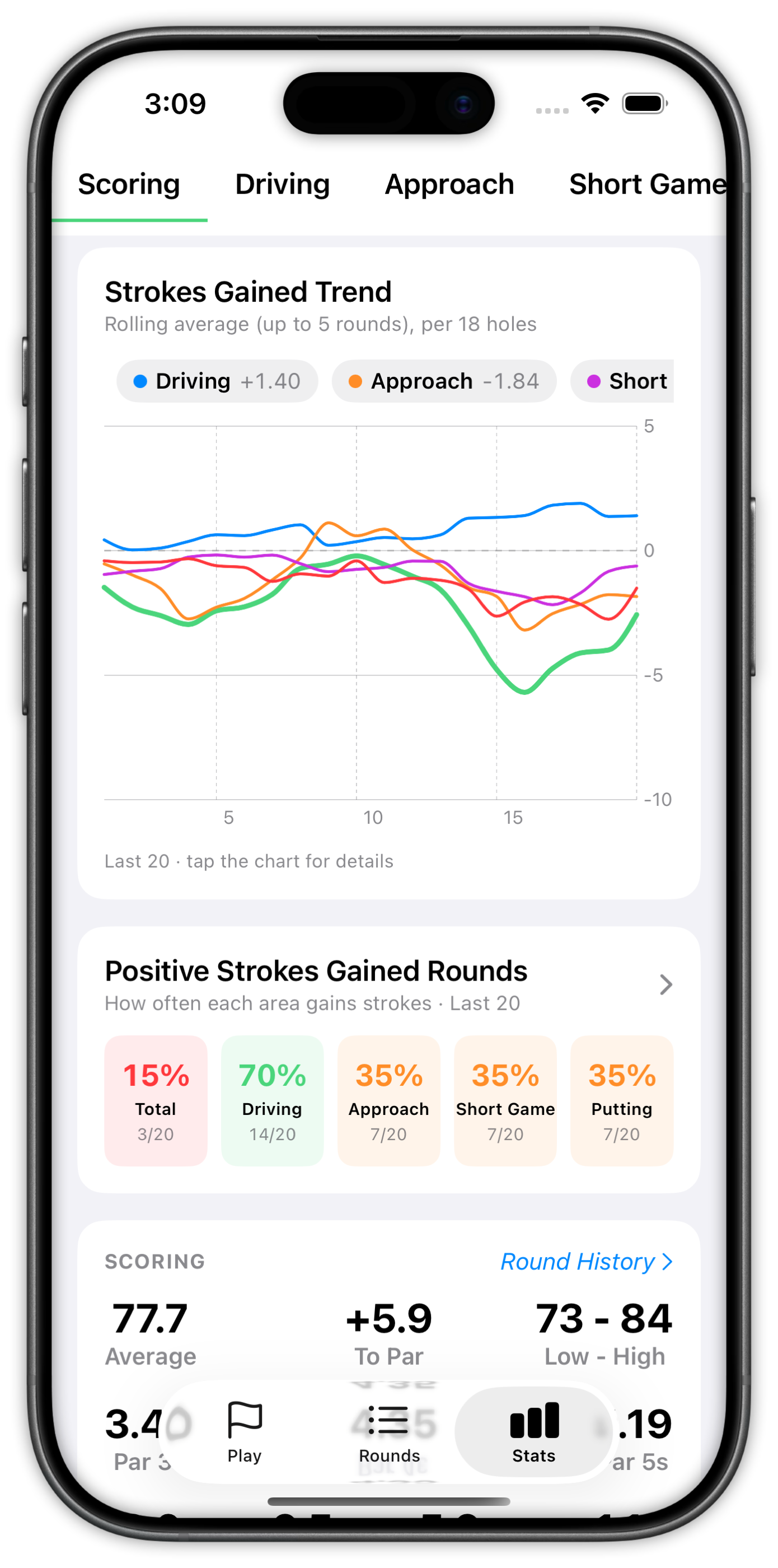
“What should I work on?”
### Take One Clear Priority Into Practice
Separate strategy mistakes from execution problems, turn round data into a focused practice priority, and share the complete picture with your coach at no additional cost.
[](https://shotpattern.app/hs/cta/wi/redirect?encryptedPayload=AVxigLJa0onAd%2B1I8RyCxrm5EtD8ncEKJBHOoJuJlsCJ%2Bj%2Bhy9U9Y40Enlk%2FKEEZ2cgCUFLZzNfRvIYncFozqEF9hPtYPxK%2BVTUcpjVmSpzhAarEvqSSEBFnWEdXB%2FMadfs0G%2BPfDA%2BDpsbBm9e%2FInbDVVaPbb5CqwAG3JWXbZ0q0cZGhNPExZ6d9xxiUN%2BQ9FGoWCAlekuAheVkTIjKFA%3D%3D&webInteractiveContentId=382453896896&portalId=51325885)
---
DON'T SETTLE FOR GENERIC STATS & DISTANCES
## Most GPS Apps are Giving You the Wrong Information
Most apps give you yardages to hazards, we help you avoid them.
We believe that a golf GPS app should help you shoot lower scores. We focus on giving you tools and data you can use to play better golf – not social features.
- Learn your true shot dispersion and use it to pick smarter targets
- Track the data that actually matters – fairways, greens, and putts is not enough.
- A dedicated Course Preview mode to game plan before you play
- Green maps, elevation, and wind info you can use in every round (even tournaments)
- Easily share data with your coach
100,000+
golfers trust Shot Pattern to help their game.
[See the Shot Pattern difference →](https://shotpattern.app/features)
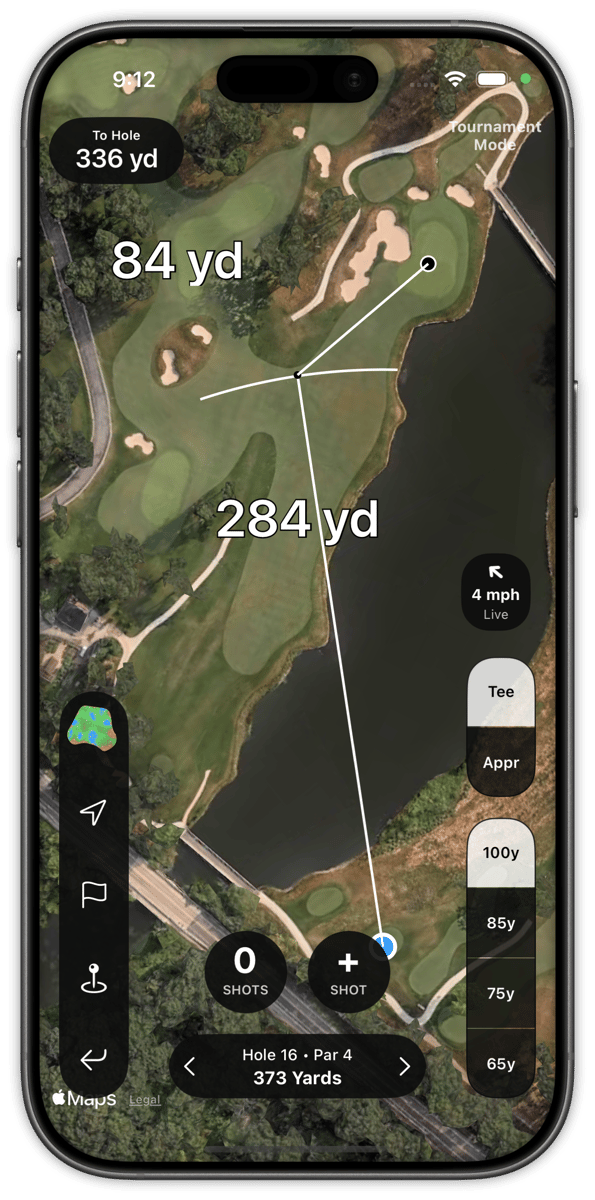
See where to aim to take trouble out of play
Built for the Rounds That Matter Most
## Your Tournament Legal Competitive Edge
Turn on Tournament Mode and Shot Pattern automatically hides live strokes gained and the Strokes Gained Predictor while keeping its competition-ready GPS and strategy tools available.
Preview unfamiliar courses before the round and pre-set your targets and record notes. Use your dispersion visuals, GPS distances, static elevation information, and wind & weather forecast conditions during play. Then unlock the complete breakdown of every shot when the round is over.
Plan before the round. Commit during it. Learn from it afterward.
Some professional tournaments and Open Championships may invoke Model Local Rule G-11. If so, please check with your tournament committee to see which yardage books are approved for play.
Casual Mode
Tournament Mode
Tournament Mode Active
Available during play
GPS Distances
Preset dispersion sizes on tee and approach shots
Shot tracking
Green maps, elevation markers, weather & wind forecast
Automatically hidden
Strokes Gained Predictor
Live strokes gained
Live expected outcome
Casual Mode — everything on
Available during play
GPS Distances
Preset dispersion sizes on tee and approach shots
Shot tracking
Green maps, elevation markers, weather & wind forecast
Strokes Gained Predictor
Live strokes gained
Live expected outcome
Tournament mode conforms to the Rules of Golf. Permitted for USGA Qualifiers, PGA Section Events, State Amateur Championships, NCAA competitions, AJGA tournaments, and more. Please email info@shotpattern.app with any questions.
## Trusted by pros. Loved by amateurs.
Powerful enough for the world's best. Customizable to the needs of the everyday amateur.
Used Across Competitive Golf
       
As Seen In
     
---
Pricing
## Get the Data You Need to Shoot Lower Scores
Shot Pattern's Premium features give you the data you need to shoot lower scores; from customized strategy tools to advanced stat tracking, and more.
### Annual
Save 59%
$99/ year
### Six Month
$74.99/ 6 months
### Monthly
$19.99/ month
### Premium features include...
- Shot Tracking on iPhone, Apple Watch, & Mac Record when you play or enter stats after the round.
- Customizable Dispersion Overlays See your shot pattern on tee & approach shot
- Target handicap benchmarks Know what it takes to reach your goal level
- Shot by Shot Strokes Gained Know how every swing contributed to your final score
- Advanced Stats & Analytics More than just fairways, GIRs, and total putts
- Strokes Gained Predictor Turn your shot data into a data-driven strategy plan
- Tour Quality Green Maps Slope Green Maps from Strackaline
- Elevation Data on Every Hole Designed so you can use it in competition
- Wind meter & Compass Designed so you can use it in competition
- Drives in play, score killers, short-sided approaches We automatically calculate the stats that impact scoring
- Dispersion Stats & Charts on Every Part of Your Game See the "why" behind where you're losing strokes.
- Course Preview, Saved Targets & Hole Notes Plan your strategy ahead of time, access it during your round
- Free Launch Monitor Data Uploads Quickly build a picture of your shot dispersion
- Share Data with Your Coach It's free to invite your coach to have access to your rounds & stats.
- PDF Reports Export your data to analyze with AI or share with your coach
- Print Yardage Books Print yardage books from home with your saved targets, notes, elevation changes, a compass, and the wind forecast.
- Permitted for Tournament Play A true competitive advantage you can keep by your side in the rounds that matter most
[](https://shotpattern.app/hs/cta/wi/redirect?encryptedPayload=AVxigLJa0onAd%2B1I8RyCxrm5EtD8ncEKJBHOoJuJlsCJ%2Bj%2Bhy9U9Y40Enlk%2FKEEZ2cgCUFLZzNfRvIYncFozqEF9hPtYPxK%2BVTUcpjVmSpzhAarEvqSSEBFnWEdXB%2FMadfs0G%2BPfDA%2BDpsbBm9e%2FInbDVVaPbb5CqwAG3JWXbZ0q0cZGhNPExZ6d9xxiUN%2BQ9FGoWCAlekuAheVkTIjKFA%3D%3D&webInteractiveContentId=382453896896&portalId=51325885)
Get double the free trial by checking out on the Shot Pattern website.
FAQ
## Frequently asked questions
Is Shot Pattern tournament legal?
Yes. Shot Pattern's Tournament Mode is permitted in any event played under the Rules of Golf, including USGA, state amateur, NCAA, and AJGA events. Live strokes gained and the Strokes Gained Predictor are automatically hidden in Tournament Mode, while dispersion visuals, elevation data, and wind forecast all remain available.
Features are designed so that they are in compliance with [Rule 4.3(2)a](https://www.usga.org/rules/rules-and-clarifications/rules-and-clarifications.html#section=rules&itemNum=7&subItemNum=3)
How does Shot Pattern calculate strokes gained?
Shot Pattern calculates strokes gained on a shot by shot basis by comparing your actual result to the expected strokes to hole out from your starting position. The app uses distance and lie type for every shot, which means you see where you gained or lost strokes instead of only getting a round total. Some other golf apps only report aggregate strokes gained by category, not individual shots.
What is shot dispersion and why does it matter?
Shot dispersion is the pattern your shots actually land in with a given club. Most golfers only think about how far they hit it, but dispersion captures both distance and direction. That matters because smart course strategy accounts for the full range of outcomes, not just your best swing. Further, having a picture of your shot dispersion gets deeper into the "why" behind each shot so that you can have clearer answers of what to work on.
Shot Pattern shows your dispersion as tee arcs and approach circles overlaid on the hole, so you can pick targets that keep your realistic miss in play.
Do I need extra hardware or sensors to use Shot Pattern?
No. Shot Pattern uses your iPhone's GPS to track shots during a round, with no club sensors, wearables, or external devices required.
An Apple Watch can be used to record shots, but it is not required.
You can also log rounds manually after play, or upload launch monitor data from a range session to build your dispersion faster.
How does the Strokes Gained Predictor work?
The Strokes Gained Predictor projects your personal shot dispersion onto any hole and calculates expected strokes gained for each club and target combination. It factors in the lie types in your landing zones using the course map, so it tells you whether driver or iron is the better play before you swing. For holes with incomplete map data, you can draw in trees, bunkers, or out of bounds areas and the math recalculates.
How much does Shot Pattern cost?
Shot Pattern is available on a free trial, then $19.99 per month or $99 per year. The annual plan saves 59 percent compared to monthly billing. Shot Pattern is available only on iOS and MacOS.
Does Shot Pattern work on Apple Watch?
Yes. Apple Watch users can record shot locations, club choices, and hole locations without opening the iOS app during their round.
The Apple Watch app also comes with auto swing detection for those users who want to ply as hands-free as possible.
[](https://shotpattern.app/hs/cta/wi/redirect?encryptedPayload=AVxigLKc6xpQWrlHHiJa%2B4AWmFyVCfwmutLAJ5TxEABm0AKro9PcPT8vLhu02jDTLuvGvpQee8XXGx1YmDMyPOBFZZolRTx2fDZ1h7QPXDaYNIcaxV%2FSKYxIEJXgzf1Ffz6B1Awu7Mq2rtiowDLRn%2Fz0w1NIe7XholKe2W6c0VmLuPRwyGduRqND1h2mhsgDODRoUrYECtmOp23yF%2Bv4en8eNoiO98ivCKWQRQPtPfHJuLcJPLcITKlOlQ%3D%3D&webInteractiveContentId=211194211201&portalId=51325885)
[](https://shotpattern.app/hs/cta/wi/redirect?encryptedPayload=AVxigLJMzfhT7TcSa8rfFpTQZKEKIKtQyB92GUY5VmrBQTUX4d%2BIzT0%2BGR0O4DENPhoQt6qKeMcDfvWhoI%2BAksNO%2FiWT%2BarFnkIAGJBIed6t9rVlFRWQxL57fZiisg4fj6ZAnyF5KoOngAd8orkxf30vAr9goxL3T910%2FHFsQersJ%2B%2BCufBWWd17AjOtR7GrrqUUTs%2F%2BqyKXaFVRUDdLCB2YENDV3BpABtWc7oQtLEVAM3yRIfe5KZx2wJVxG5NgOewIwXzwKyjPWyTRBrhOkjsTItvV8hTFfloGPXcpAITB1C4BQ9lNn5raHAQqGdZJvQ5z%2BH3%2B%2Fv0g%2FbFIVZe7sQFjCpZHnHly0ogqQBDCmKDxCPaO8A%3D%3D&webInteractiveContentId=424135045843&portalId=51325885)
[](https://shotpattern.app)
---
[Terms of Use](https://shotpattern.app/terms-of-use) · [Privacy Policy](https://shotpattern.app/privacy-policy) ·[Support](https://shotpattern.app/support) · [Help Center](https://shotpattern.app/help)
© 2026 Undaunted Athlete, LLC. All rights reserved.
```json
{
"@context" : "https://schema.org",
"@type" : "SoftwareApplication",
"aggregateRating" : {
"@type" : "AggregateRating",
"bestRating" : "5",
"ratingCount" : "1400",
"ratingValue" : "4.8",
"worstRating" : "1"
},
"applicationCategory" : "SportsApplication",
"applicationSubCategory" : "Golf GPS",
"description" : "Shot Pattern is the golf GPS app that overlays your shot dispersion and live strokes gained on every hole. Pick smarter targets. Shoot lower scores.",
"downloadUrl" : "https://apps.apple.com/us/app/shot-pattern-golf-gps/id6447127454",
"name" : "Shot Pattern",
"offers" : [ {
"@type" : "Offer",
"category" : "subscription",
"name" : "Annual Subscription",
"price" : "99.00",
"priceCurrency" : "USD"
}, {
"@type" : "Offer",
"category" : "subscription",
"name" : "Monthly Subscription",
"price" : "14.99",
"priceCurrency" : "USD"
} ],
"operatingSystem" : "iOS",
"publisher" : {
"@type" : "Organization",
"name" : "Undaunted Athlete, LLC",
"url" : "https://shotpattern.app/"
},
"url" : "https://shotpattern.app/"
}
```
```json
{
"@context" : "https://schema.org",
"@type" : "FAQPage",
"mainEntity" : [ {
"@type" : "Question",
"acceptedAnswer" : {
"@type" : "Answer",
"text" : "Yes. Shot Pattern's Tournament Mode is permitted in any event played under the Rules of Golf, including USGA, state amateur, NCAA, and AJGA events. Live strokes gained and the Strokes Gained Predictor are automatically hidden in Tournament Mode, while dispersion visuals, elevation data, and wind forecast all remain available."
},
"name" : "Is Shot Pattern tournament legal?"
}, {
"@type" : "Question",
"acceptedAnswer" : {
"@type" : "Answer",
"text" : "Shot Pattern calculates strokes gained on a shot by shot basis by comparing your actual result to the expected strokes to hole out from your starting position. The app uses distance and lie type for every shot, which means you see where you gained or lost strokes instead of only getting a round total. Most other golf apps only report aggregate strokes gained by category, not individual shots."
},
"name" : "How does Shot Pattern calculate strokes gained?"
}, {
"@type" : "Question",
"acceptedAnswer" : {
"@type" : "Answer",
"text" : "Shot dispersion is the pattern your shots actually land in with a given club, not just the average distance. It matters because course strategy depends on the full range of outcomes, not the best case. Shot Pattern shows your dispersion as tee arcs and approach circles overlaid on the hole, so you can pick targets that keep your realistic miss in play."
},
"name" : "What is shot dispersion and why does it matter?"
}, {
"@type" : "Question",
"acceptedAnswer" : {
"@type" : "Answer",
"text" : "No. Shot Pattern uses your iPhone's GPS to track shots automatically during a round, with no club sensors, wearables, or external devices required. You can also log rounds manually after play, or upload launch monitor data from a range session to build your dispersion faster."
},
"name" : "Do I need extra hardware or sensors to use Shot Pattern?"
}, {
"@type" : "Question",
"acceptedAnswer" : {
"@type" : "Answer",
"text" : "The Strokes Gained Predictor projects your personal shot dispersion onto any hole and calculates expected strokes gained for each club and target combination. It factors in the lie types in your landing zones using the course map, so it tells you whether driver or iron is the better play before you swing. For holes with incomplete map data, you can draw in trees, bunkers, or out of bounds areas and the math recalculates."
},
"name" : "How does the Strokes Gained Predictor work?"
}, {
"@type" : "Question",
"acceptedAnswer" : {
"@type" : "Answer",
"text" : "Shot Pattern is available on a free trial, then $14.99 per month or $99 per year. The annual plan saves 45 percent compared to monthly billing."
},
"name" : "How much does Shot Pattern cost?"
}, {
"@type" : "Question",
"acceptedAnswer" : {
"@type" : "Answer",
"text" : "Yes. Apple Watch users can drop breadcrumbs during a round to mark where each shot occurred, which makes post-round Manual Round Entry much faster."
},
"name" : "Does Shot Pattern work on Apple Watch?"
} ]
}
```