Editing Your Lie Type
Shot Pattern detects your lie automatically on every shot — it knows the actual shape of every fairway, green, and bunker on the course, so most of the time you never think about it. But the map can't see everything. It can't see that your ball is sitting down in gnarly grass, or that a tree is blocking your line to the green. That's what lie editing is for, and getting it right is one of the highest-leverage habits in the app: your lie is the single input that tells the strokes gained engine how hard your shot actually was.
The good news is that editing a lie takes about two seconds. The judgment calls — recovery or rough? green or fairway on the fringe? — take a little longer to learn, and that's what most of this guide covers.
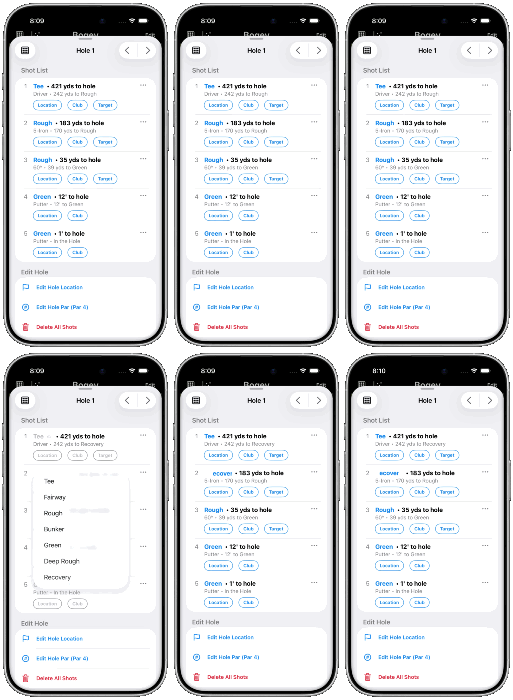
How to Change a Lie
From any hole, open the shot sheet and look at your Shot List. Each shot leads with its lie in blue — Tee, Rough, Green, and so on — right next to the distance to the hole.
Tap the lie. A picker appears with every option:
- Tee
- Fairway
- Rough
- Bunker
- Green
- Deep Rough
- Recovery
Tap the one that matches where your ball was actually sitting, and you're done. The shot updates instantly, and every strokes gained number it touches recalculates on the spot.
That's the whole mechanic. You can do this during the round, walking off the green, or three years later — nothing in Shot Pattern is set in stone.
Why the Lie Matters So Much
Every lie carries an expected score. From 183 yards in the fairway, the data expects one thing of you; from 183 yards behind a tree, it expects something very different. When you change a shot's lie, you're telling the app which expectation to hold you to — and, just as importantly, you're telling it how to judge the shot that put you there.
Here's the concrete version. Say your drive finishes in the trees and the app auto-detected it as Rough. If you leave it, your drive looks merely mediocre, and your escape shot gets graded like a normal 183-yard approach — which it will inevitably "fail." Change that lie to Recovery, and two things happen at once: the tee shot absorbs the penalty for putting you in jail, and the expectations for your next shot drop to match reality. The blame lands on the swing that earned it.
That's the whole point of strokes gained: assigning each stroke's cost to the right shot. An honest lie is what makes the assignment honest.
The Judgment Calls
The automatic detection handles the easy stuff — fairway, rough, bunker, green. Three lies require your judgment, because only you were standing over the ball.
When Is a Shot a Recovery?
Mark a shot as Recovery when the lie dictates that you cannot play a normal shot toward the green. Normally this is because of trees in your line toward the green, or because of deep grass that won't allow you to play the shot normally.
A common misconception is that Recovery means you were forced to chip out sideways. It doesn't. If you're behind a tree and your only real play is a low punch that advances 120 yards up the fairway, that's a recovery shot even though it went straight toward the hole. The direction you hit it doesn't matter; what matters is that the situation dictated the shot instead of you choosing it.
What About Deep Rough?
Deep Rough is the middle ground between normal rough and a full recovery. If you find yourself in a spot where the shot is definitely harder than being in the normal rough, but not so thick that you're just chunking it out 50 yards, it's probably a deep rough lie.
This is the least used lie of all the lie various lie types.
A useful way to think about the three tiers:
- Rough — off the fairway, but you can play your normal shot.
- Deep Rough — you can still go at the green, but the lie is costing you.
- Recovery — the lie has taken the normal shot away entirely.
My Ball Is on the Fringe. What Do I Pick?
There's no Fringe option, and that's deliberate — the fringe isn't one kind of lie. It's three, depending on how the shot actually plays:
If you can putt normally, without factoring in a change of speeds, mark it Green. Yes, technically you didn't earn a green in regulation — but the difficulty of the shot is most comparable to being on the putting surface, and difficulty is what strokes gained cares about.
If you're putting through fringe and the putt has two different speeds because of the different grasses, choose Fairway. That extra read-and-touch problem is real, and Fairway captures it.
If your ball is sitting against the collar and the rough is interfering with your ability to play the shot — you're debating a bellied wedge, or chopping at it with the toe of the putter — choose Rough. The shot is hard for rough-lie reasons, so grade it that way.
The thread running through all three: pick the lie that matches the difficulty of the shot you faced, not the technical name for the grass.
The Other Edits on This Screen
While you're in the Shot List, the same row gives you two more one-tap edits: Club (change what you hit) and, on full shots, Target (adjust where you were aiming). And the ••• menu on each shot handles everything else — moving the shot on the map, deleting it, inserting a forgotten one. Lie is just the edit you'll reach for most, because it's the one the map can't always get right on its own.
Frequently Asked Questions
Does editing a lie change my score?
No. Your score is your number of shots; the lie only changes how those shots are graded. Flip a Rough lie to Recovery and your 5 is still a 5 — but the strokes gained math redistributes the blame.
Should I mark Recovery any time I hit a bad shot from the trees?
Only if the lie forced the shot. If you had a clean look at the green from the pine straw and just hit it badly, that's a Rough (or Deep Rough) lie and a bad swing — and your stats should say so. Recovery is for situations, not outcomes.
The app auto-detected the wrong lie. Is that normal?
Occasionally, yes. Detection is based on the mapped shapes of the course, so it nails fairway/rough/bunker/green boundaries but can't see grass depth or tree trouble. Deep Rough and Recovery will always be your call, and a ball resting a pace off a boundary can land on the wrong side of the line. That's exactly what the two-second edit is for.
When should I make these edits?
Whenever it's convenient — between holes, at the turn, or reviewing the round that night. Lies are editable forever, and every change recalculates your stats instantly. The only real deadline is your memory: it's easier to remember that a lie was ugly the same day than three weeks later.
Does the lie affect anything besides strokes gained?
Yes — your lie chains and any stat filtered by lie (approach performance from the rough vs. the fairway, scrambling by lie, and so on). One honest edit improves several views of your game at once.