---
title: Shot Pattern Features | GPS, Dispersion & Strokes Gained
description: Shot Pattern includes dispersion visuals, strokes gained, 3D course preview, flexible shot tracking, tournament legal GPS tools, and a coach portal.
---
[Skip to content](https://shotpattern.app/features#main-content)
[](https://shotpattern.app/)
[How it Works](https://shotpattern.app/features) [Pricing](https://shotpattern.app/pricing) [Blog](https://shotpattern.app/blog)
[](https://shotpattern.app/hs/cta/wi/redirect?encryptedPayload=AVxigLKDHyFelSdOFogJwKT6nbAtPKk9yov38oqxxWq8JrdVj3gMVKbIAi1IsZg2ih%2Fhpka5nF5ksMqHdemX%2BtrpppePj8uxPnqFhBIGAzK0wZc3%2FqFqE1kllAOW0dCZbY2kbE4QuSHFybTTGYs%2BPJypCwcsIph1wu20UnbVgo34QXg9Z4sNmyJxiM3ER1boW8Xv8zGNO6JEppqxCzMrLA%3D%3D&webInteractiveContentId=382152027853&portalId=51325885)
THE MOST COMPREHENSIVE GPS, STATS, & STRATEGY APP ON THE MARKET
# Shot Pattern has what you need to shoot lower scores.
Loaded with features designed to give you the data you need to play your best golf.
### [On-Course GPS with Dispersion Visuals More than just distances to the green and hazards. Quickly see and measure how your shot dispersion fits any hole in the world so that you can pick the right target. →](https://shotpattern.app/features#gps-dispersion)
### [Flexible Shot Tracking Track on iPhone from within the app or your lock screen, Auto Swing Detection on Apple Watch, or enter everything after the round. →](https://shotpattern.app/features#shot-tracking)
### [Advanced Stats & Analytics with Shot by Shot Strokes Gained Strokes gained by shot, by club and by distance range, alongside dispersion trends, proximity, up-and-downs, make percentages and scoring breakdowns. →](https://shotpattern.app/features#strokes-gained)
### [Beyond Strokes Gained: Full Insight Into Your Dispersion Most stats platforms stop at strokes gained. Shot Pattern gives you the 'why' behind each shot so that you can distinguish a skill problem from a strategy problem. →](https://shotpattern.app/features#dispersion-insight)
### [Personalized Benchmarks Compare yourself to a Tour Pro, Female Pro, Scratch, 5, 10, 15, or 20-Index to see exactly where you need to improve to get to the next level. →](https://shotpattern.app/features#benchmarks)
### [Find the Target that Gives you the Lowest Expected Score with Strokes Gained Predictor Compare club and target options and find the perfect play based on your data. →](https://shotpattern.app/features#sg-predictor)
### [2D & 3D Course Preview Prepare for new courses and tournament rounds. Measure landing areas, see contours and slopes, and arrive confident in your plan. →](https://shotpattern.app/features#course-preview)
### [Live Strokes Gained See where strokes are won and lost before you hit the shot. Each shot result's strokes gained values are exposed before you hit the shot so that you can explore tradeoffs. →](https://shotpattern.app/features#live-strokes-gained)
### [Green Maps & Other Tournament Legal Tools StrackaLine green maps, elevation markers, wind and weather forecasts all inside a Tournament Mode built for competition rounds. →](https://shotpattern.app/features#tournament-mode)
### [Coach Portal for Teams & Instructors Coaches can monitor their students and teams. See every detail from a player's round and track their performance over time. →](https://shotpattern.app/features#coach-portal)
### [PDF Exports to Use With Your Coach or AI Export the full stats report as a PDF, and share your rounds with your coach or an AI tool of your choice at no additional cost. →](https://shotpattern.app/features#pdf-report)
### [Launch Monitor Data Upload Import launch monitor and range-session data so your distances and dispersion come from measured shots rather than guesses. →](https://shotpattern.app/features#launch-monitor-data-upload)
### [Print Yardage Books Print yardage books from home with your saved targets, your notes, elevation changes, a compass, and the wind forecast. →](https://shotpattern.app/features#yardage-books)
On-Course GPS Experience
## Strategy-First On Course GPS
Front, middle and back are table stakes. Shot Pattern shows you how your shots actually fit the hole in front of you.
Every GPS app can tell you it is 148 to the middle. Shot Pattern draws your own dispersion on top of the hole, so you can see the pattern your swing really produces against the fairway, the rough, the bunkers, the water and the out of bounds — and measure it before you commit to a target.
- Four tee arc sizes to match your dispersion with the clubs you use off the tee
- Four approach circle sizes to match your median proximity from 100, 125, 150, and 175 yards
- Move the target and watch the whole pattern move with it
Tournament Legal
Permitted Under the Rules of Golf
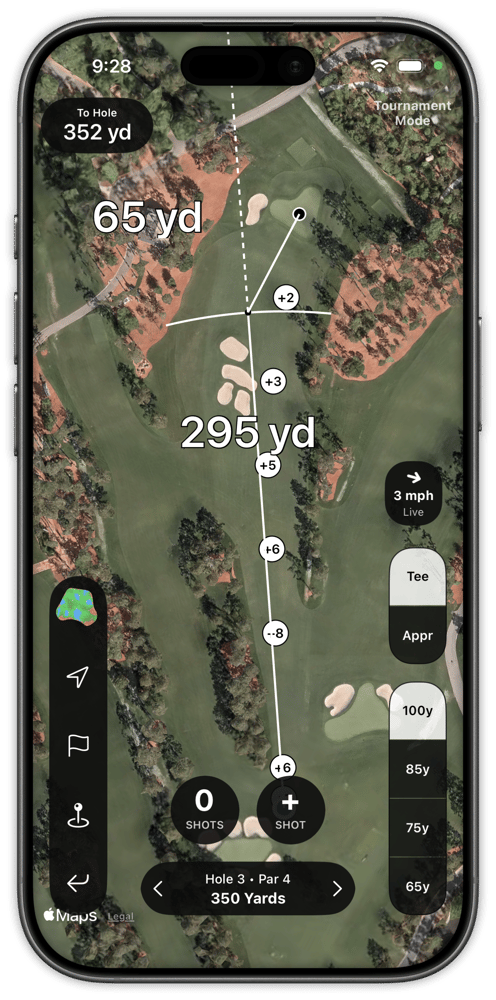
Tee Arcs
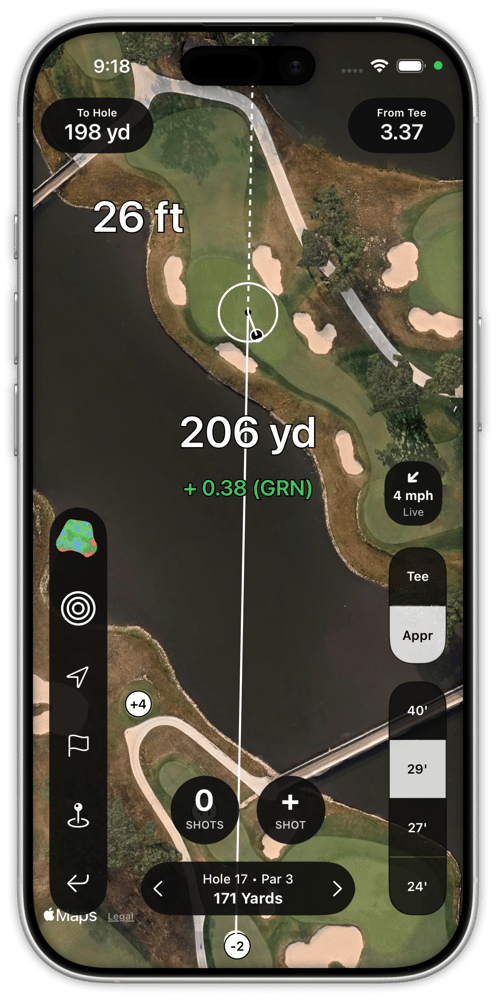
Approach Circles
TRACKING YOUR SHOTS WITH SHOT PATTERN
## Golf's Most Flexible Shot Tracking System
Capture what you want during the round. Save the rest for off the course. Our shot tracking system is designed around giving you the flexibility to track shots the way you want.
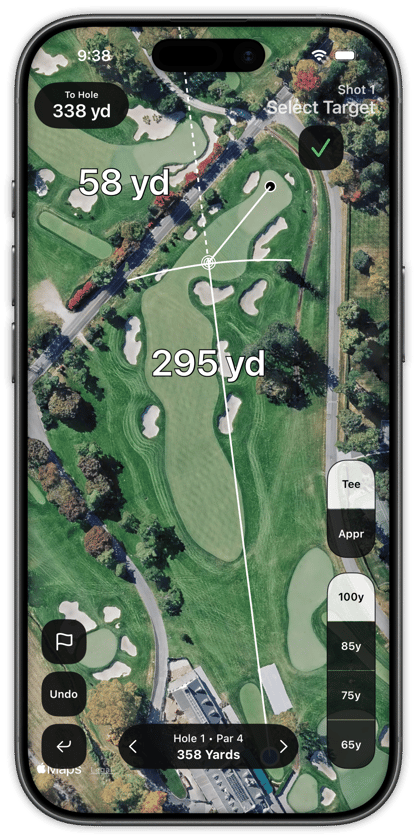
- Track from the lock screen or in the app on iPhone
- Auto swing detection on Apple Watch
- Capture intended targets & club choices - or drop breadcrumbs and come back to those details later
- Add or edit any shot after the round
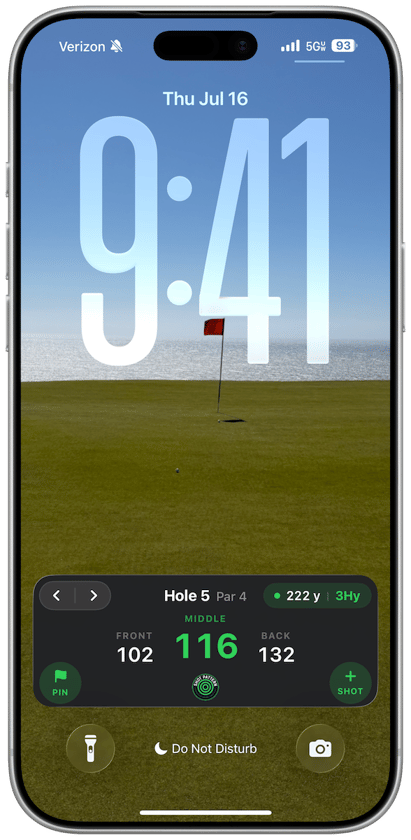
From Your Lock Screen
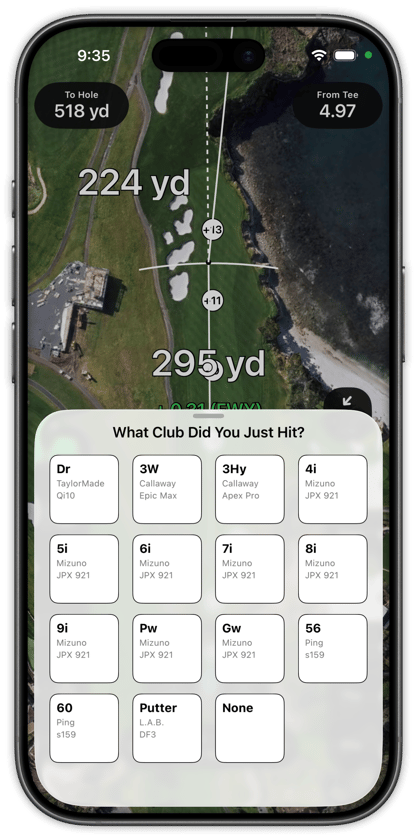
In the App
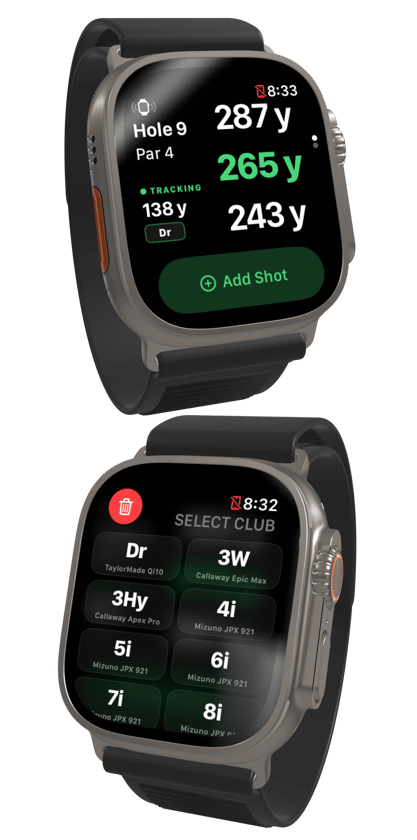
On Your Watch
Or Wait to Enter Everything After the Round
Advanced Stats & Analytics
## Strokes Gained, Down to the Individual Shot
Get a shot by shot evaluation of every round so that you can see where you excelled, and where you need work.
- Driving, Approach, Short Game, & Putting Strokes Gained Totals
- Strokes Gained values for every shot
- "Score Killers" tell you where you're giving away easy shots.
- Best & worst shots highlights
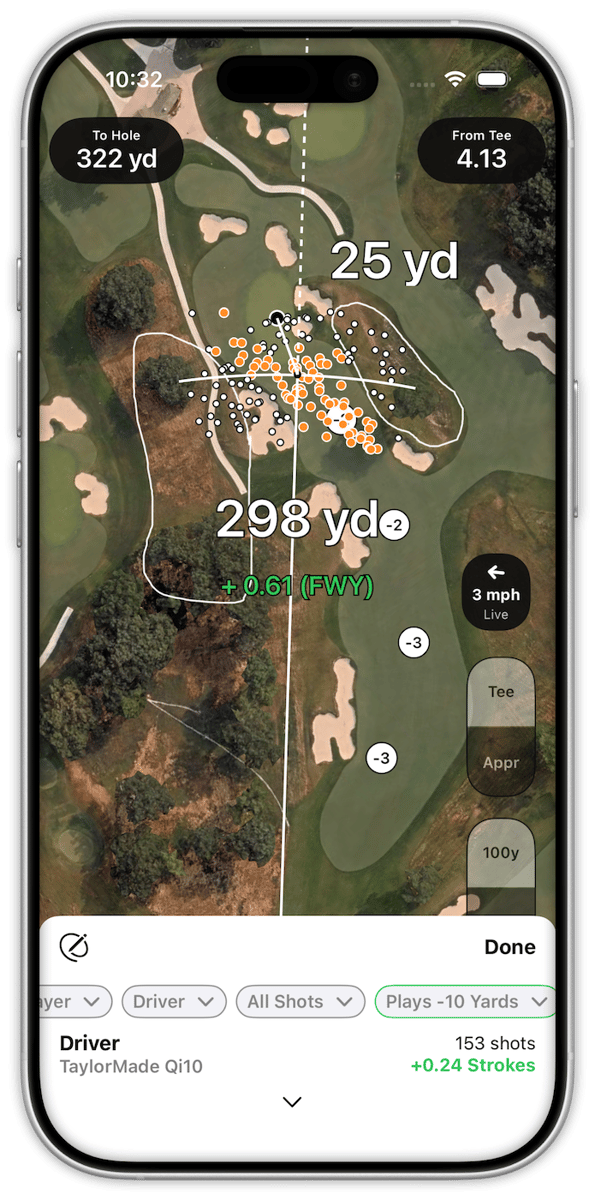
- Heat maps illustrate your driving and approach play
- Drives in play, big misses, approach proximity by start distance, short-sided up & downs, and more...
Because simply measuring fairways, greens, & putts is not enough to actually help you get better.
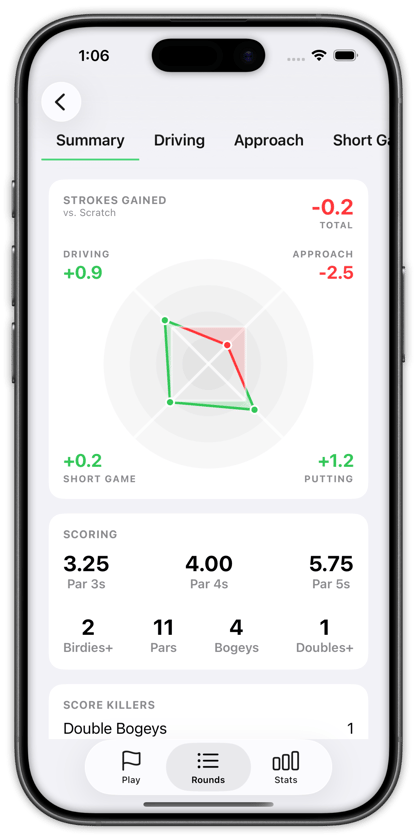
Round Summary
Top level performance gives you an overview of each facet of your game.
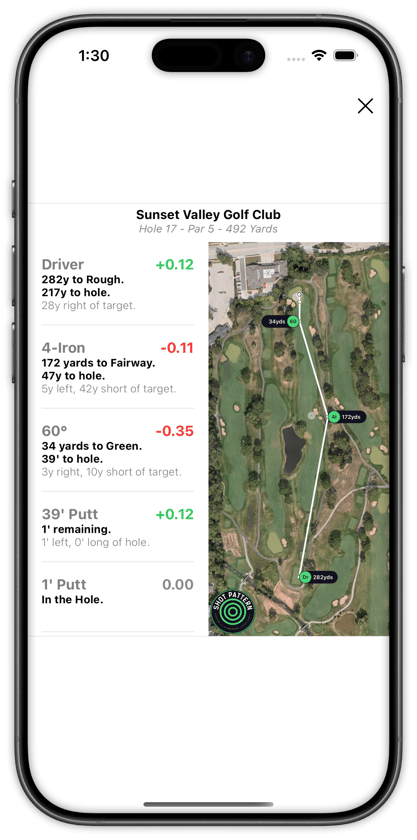
Maps and Stats Side by Side
See where every shot went and how it contributed to your final score.
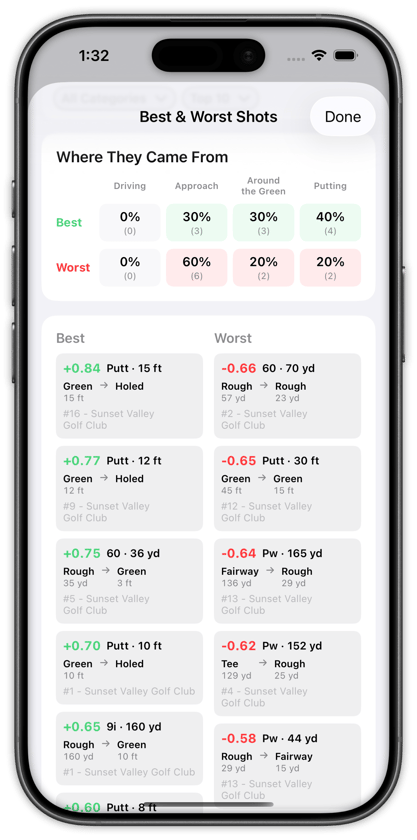
Review Your Best & Worst
Relive the highlights. Know what to work on.
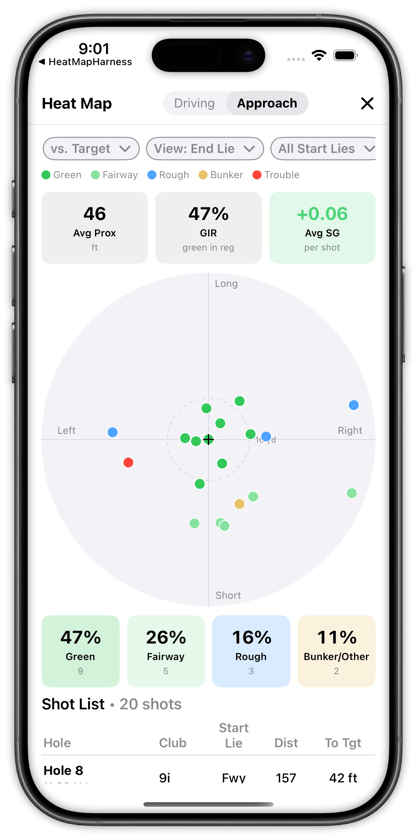
Heat Map of Every Shot
A tappable heat map allows you to review every shot from the round.
Beyond Strokes Gained
## Strokes Gained Tells You What. Dispersion Tells You Why.
A bad number can come from a bad swing or from a bad target. Those are different problems, and they need different practice.
Most platforms stop at strokes gained. Shot Pattern takes it further to get to the root of the issue. Because we know your intended target, we can go deep into why behind every aspect of your game. That is the difference between “work on your wedges” and “you were aiming at a pin you have no business aiming at.”
- Separate execution misses from strategy misses
- Uncover miss patterns and biases that signal a swing issue, a poor club fit, or a blind spot in your game
- Give your coach more to work with on exactly where you're leaking shots
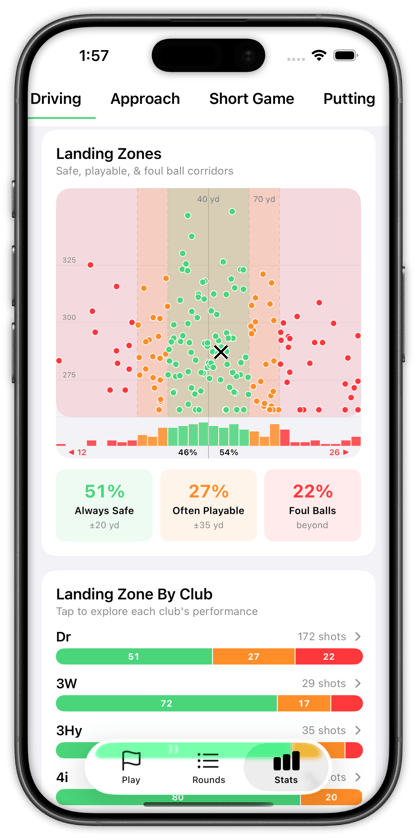
Driver dispersion landing zones tell you how well you keep the ball in play
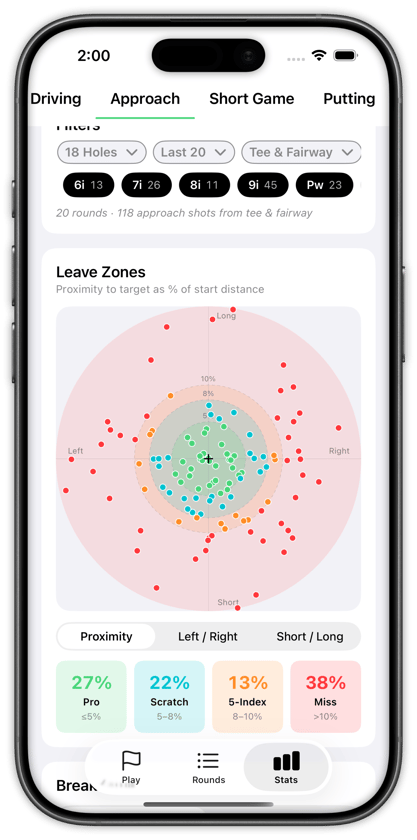
Approach dispersions benchmark just how accurate you are with each club
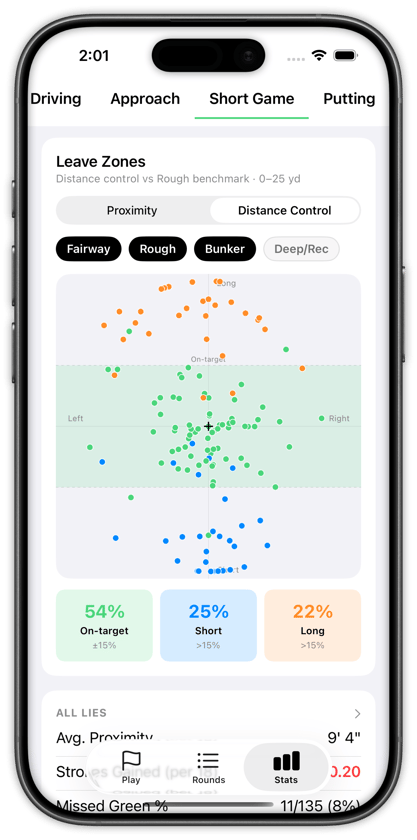
Short game distance control helps you visualize your tendencies
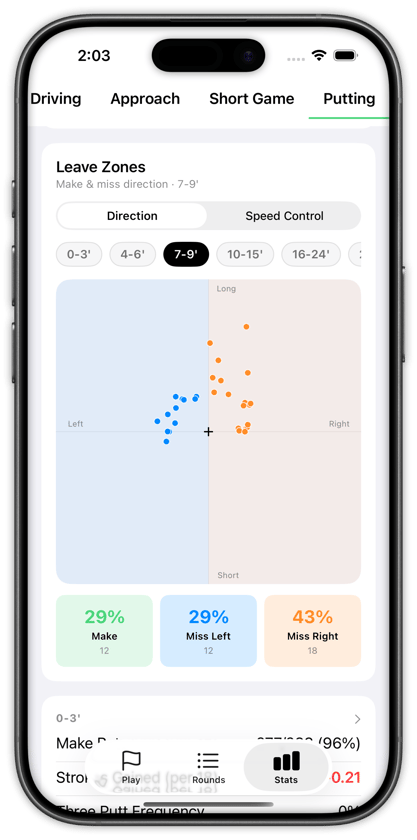
The putting dispersion stats you didn't know you needed: left/right bias & speed control
Personalized Benchmarks
## Measure Yourself Against the Player You Want to Be
Pick the standard you are chasing and see how you compare.
Strokes gained only means something next to a reference. Shot Pattern lets you choose yours — Tour Pro, Female Pro, Scratch, or a 5, 10, 15 or 20-index — and then shows which parts of your game already clear that bar and which ones are holding you back.
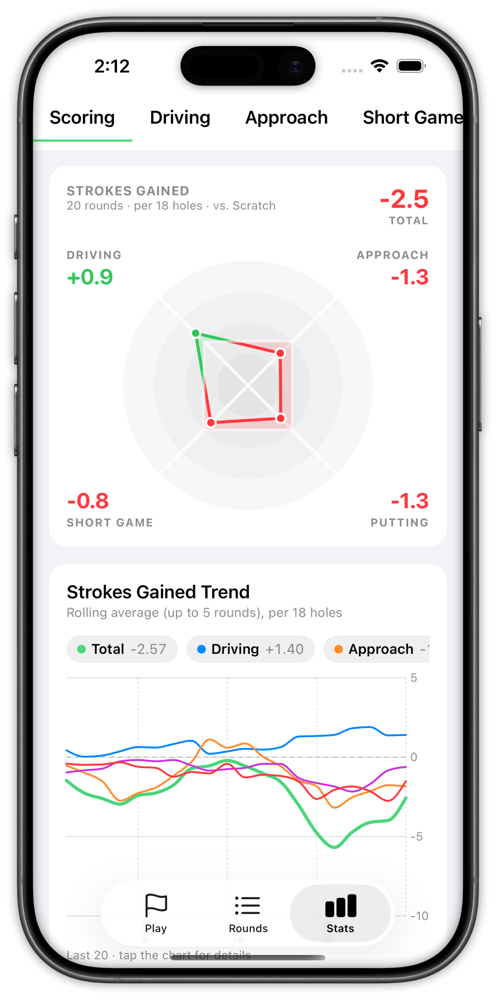
See your performance over time
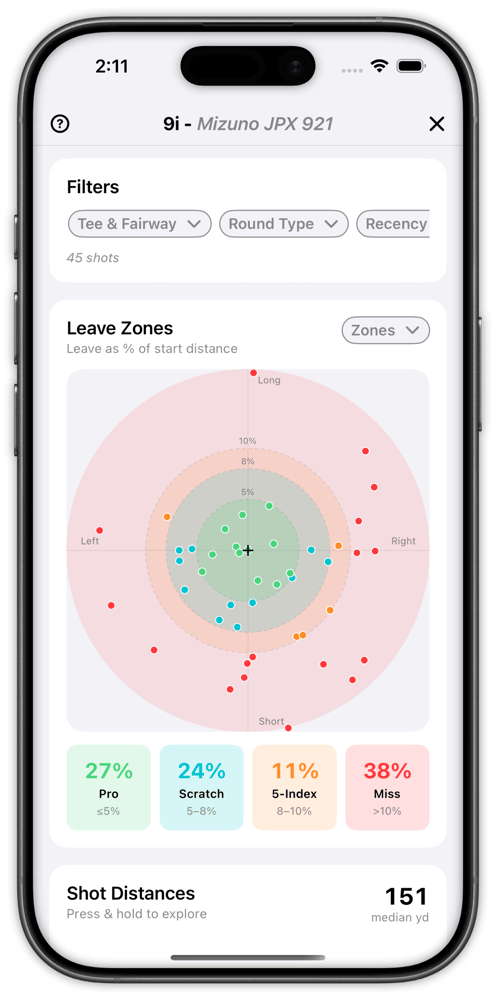
A good shot, redefined
Strokes Gained Predictor
## Find the Target With the Lowest Expected Score
Compare clubs and targets and get real data on the best play. No generic recommendations – every data point comes from your shot history in the app.
The predictor runs your dispersion against the hole and returns the expected score for the target you are standing on. Move the target, change the club, and the number moves with it — so the perfect decision off every tee stops being a matter of opinion.
Using the Strokes Gained predictor works best in our Course Preview mode where you can study the course before you play.
3D Course Preview
## Play the Course Before You Get There
Walk every hole in 3D, measure the landing areas, and arrive with a plan.
Tournament rounds and unfamiliar courses punish guesswork. Preview each hole in three dimensions, measure the carries into your landing area, read the contours and slopes around the green, and decide how you want to attack — the night before, not on the tee.
- Measure carries and landing areas and mark your target, just like you would on paper
- View elevation changes, expected wind direction, and get a feel for how every hole will play
- Download green maps and mark "no go" zones on approach shots
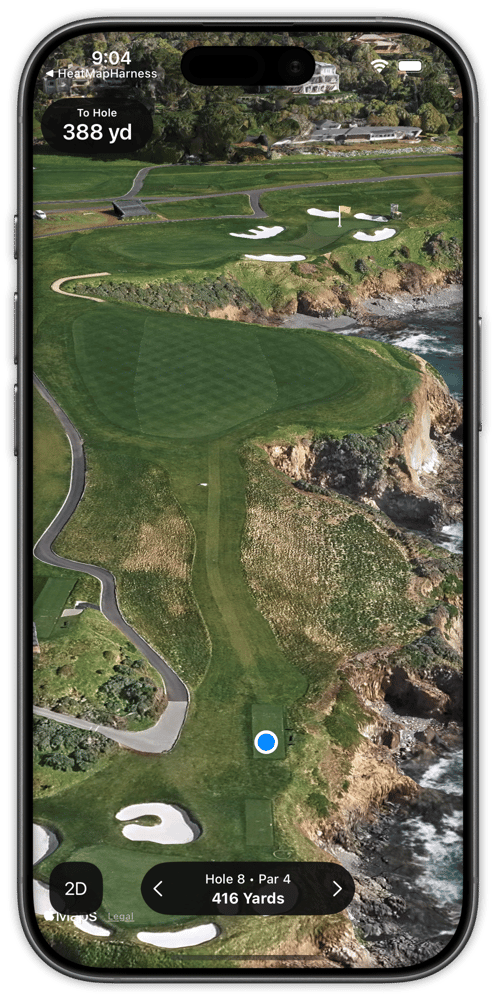
The hole in 3D
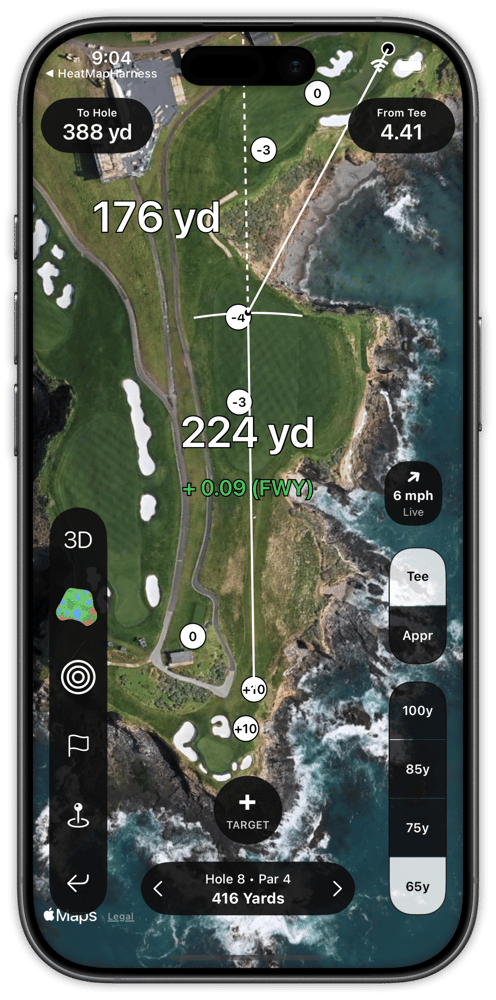
Measure the landing area
Live Strokes Gained
## See What a Shot Is Worth Before You Hit It
Strokes gained is usually something you only see after the round – we help you use it to make decisions.
Learn the real definition of a good shot. We show you the kinds of shots that gain strokes, and those that do not. When you have the values in hand up front, you can better gauge risk/reward.
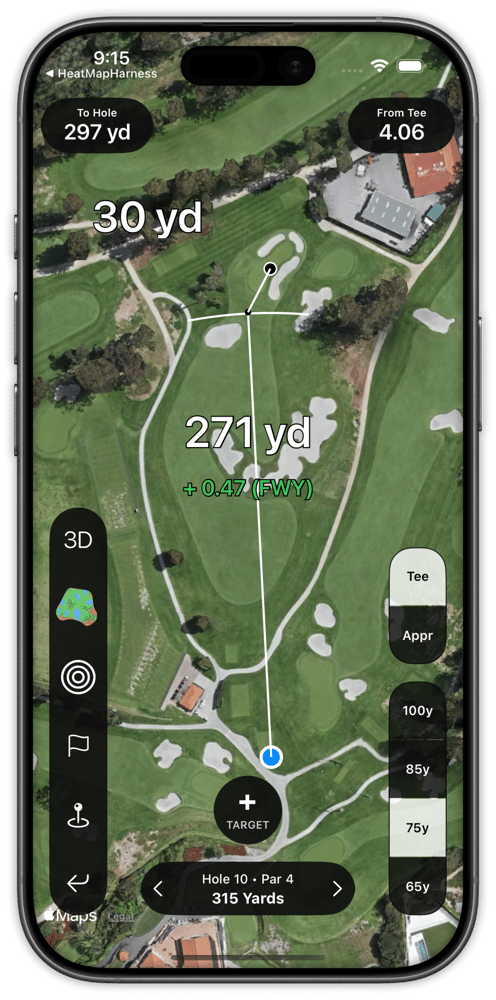
Fairway gains 0.47
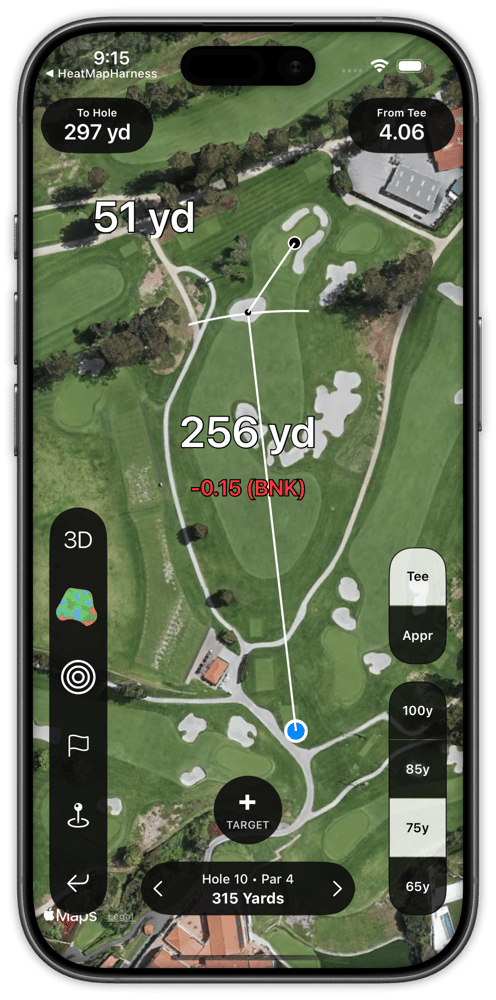
Bunker loses 0.15
Tournament Mode
## Built for the Rounds That Count
StrackaLine green maps, elevation markers, and wind and weather forecasts — inside a mode built for competition rounds.
We didn't want to build a golf app you had to set aside in the rounds that matter most. We're focused on building features that conform to the rules of golf.
Use Shot Pattern during tournaments and for rounds that count toward your handicap index.
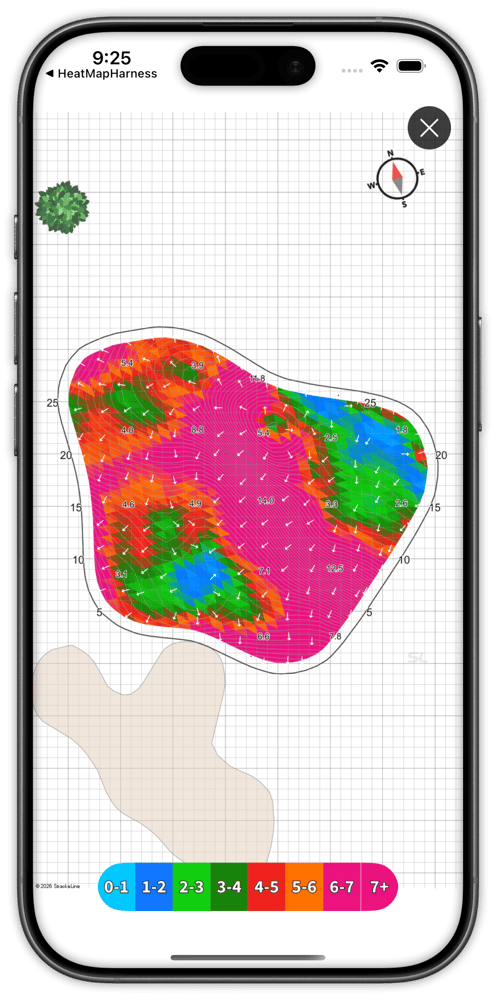
Strackaline green maps
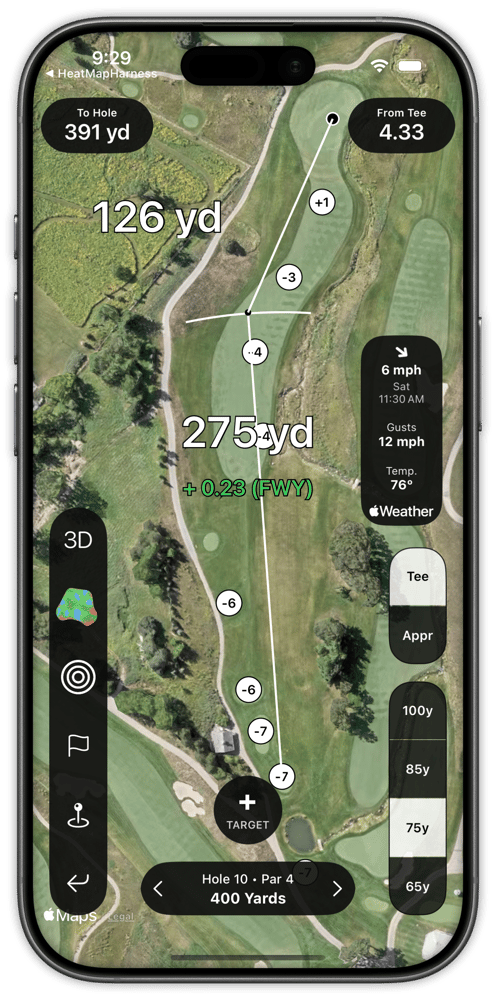
Elevation markers and wind forecast
[Wind information provided in accordance with Rule 4.3(2)a →](https://www.usga.org/rules/rules-and-clarifications/rules-and-clarifications.html#section=rules&itemNum=7&subItemNum=3)
Coach Portal
## Coaches See Every Shot the Player Hits
College Teams, Golf Academies, and Swing Coaches use Shot Pattern to deliver data-driven instruction.
Instead of a player describing their round from memory, the coach opens it. Every shot, every strokes gained number, every dispersion pattern — for one student or for a whole roster — with performance tracked over time, so a lesson can start from what actually changed rather than from what the player remembers.
FREE
Players with a Shot Pattern subscription can share data with their coach for free. Coaches just need a Shot Pattern account to view the data. No coach subscription required.
Want to buy Shot Pattern for your players? We offer team discounts. →
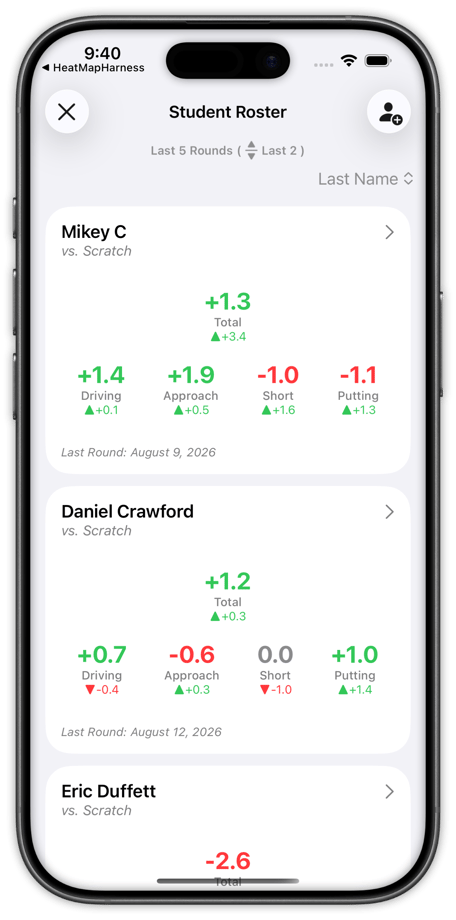
Track Every Player on Your Roster
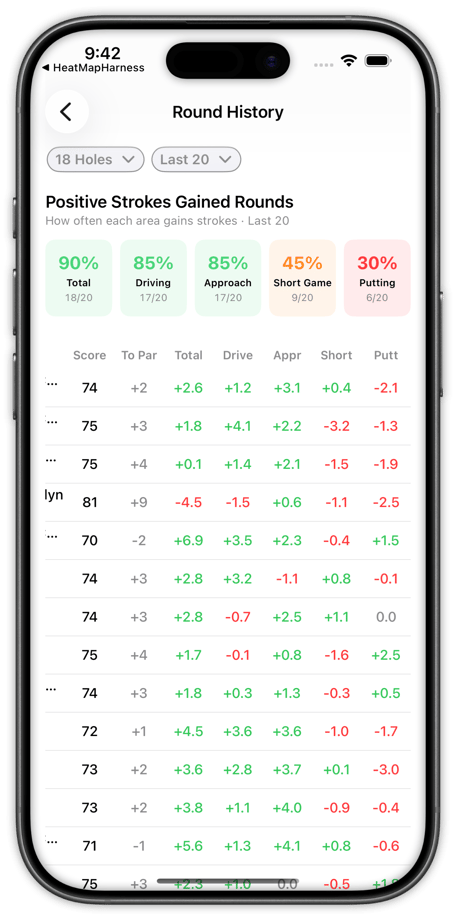
Find what to work on, together.
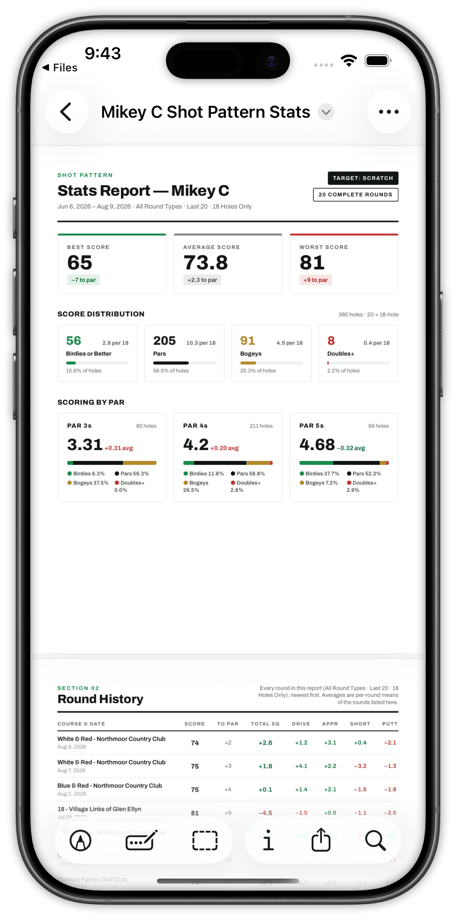
Downloadable reports on every player
PDF Exports
## Take the Whole Report Anywhere
Export the full stats report as a PDF and hand it to whoever helps you get better.
The report holds the same picture you see in the app — strokes gained by surface, scoring, benchmark comparisons, and the shots that cost you the most — written to a file. Email it to a coach, print it for a lesson, or drop it into the AI tool of your choice and ask it what to work on.
- The full stats report, exported as a PDF
- Send it to a coach, print it, or feed it to an AI tool
- Included at no additional cost
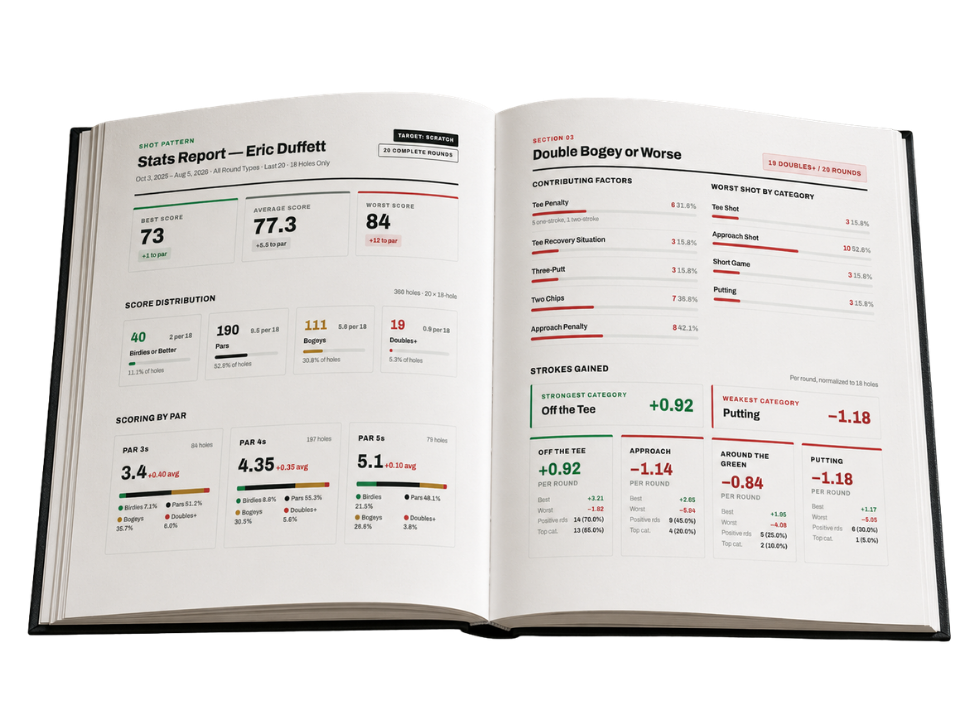
20+ Pages of Detail on Your Game
UPLOAD DATA FROM YOUR LAUNCH MONITOR
## Start From Measured Distances, Not Guesses
Import launch monitor and range-session data so your distances come from shots you have actually hit.
Most golfers have never tracked their dispersion. We make it easy to get started.
Upload your launch monitor and range sessions and Shot Pattern builds your distances and your dispersion from measured shots — which means every target, every prediction and every strokes gained number downstream starts from something real.
[](https://shotpattern.app/hs/cta/wi/redirect?encryptedPayload=AVxigLLpGvObOsaiOjCF8TBo%2FOAENiVnykcM935XJ8nyzlK%2BjTX%2BI8cUS4Ae0bcSHxAYYpn3tgzD3b7c4eps2a%2FhDTK4adZngIOH9e63qsB%2F6CGIkUNHZ3aQ867k4r%2FX%2FtpYnU%2BgNnckmpnCL7KmuArEbllPBJ%2BgEVdMftVWf7uaZ9dqlapNENzT7ZzxpOcghcNPh2%2Fwlp7iD1bKwPcss9NrLGsIepDVt7fU%2FMdxsJS%2B9mfPmUmXFKxEgQ%3D%3D&webInteractiveContentId=382151508723&portalId=51325885)
.png?length=1200&name=Launch%20Monitors%20+%20Social%20Proof%20(2235%20x%201468%20px).png)
Customized to your course plan
## Print Your Own Yardage Books
Create a plan in course preview. Export as a PDF. Print from home.
Use the + TARGET button in course preview to identify your intended target on any hole of your choice. Then, print a pocket-sized yardage book with your plan & notes from home.
Fold • Cut • Staple
Assembled in minutes.
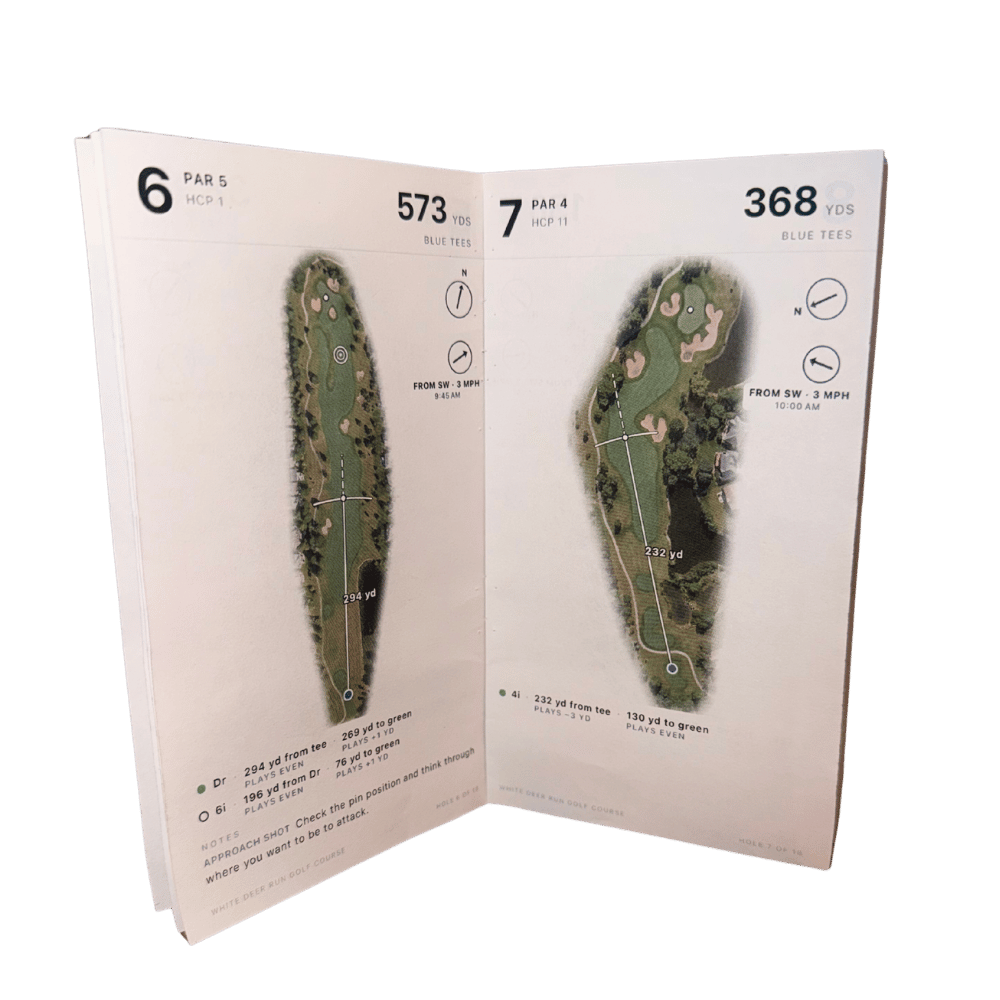
6.5" x 3.75" (Same size as a tour book)
[](https://shotpattern.app/hs/cta/wi/redirect?encryptedPayload=AVxigLKUFdLmfpOMFgf8nQzioFlyFhMKuKj7%2F2r635gURnXD6N55jExCbNuK%2FBhwRTG5GUmvOnmy1KUUggqZQVpbj5VSflcTWbFfXyn%2B7wEAkeamDZE5xBQ%2Fsv7Nqh6afC8xv5I%2FZ5aHeKk0H3kh1rHx%2B2jFpeM9zUKEs1juOhOc8jboGixkMzf%2Bx5vkWmqFAzbeCCg4VCCmW5bx9imnAw%3D%3D&webInteractiveContentId=386528894663&portalId=51325885)
[See Full Printing Instructions →](https://shotpattern.app/help/how-to-print-your-yardage-book)
[](https://shotpattern.app)
---
[Terms of Use](https://shotpattern.app/terms-of-use) · [Privacy Policy](https://shotpattern.app/privacy-policy) ·[Support](https://shotpattern.app/support) · [Help Center](https://shotpattern.app/help)
© 2026 Undaunted Athlete, LLC. All rights reserved.
```json
{
"@context" : "https://schema.org",
"@type" : "FAQPage",
"mainEntity" : [ {
"@type" : "Question",
"acceptedAnswer" : {
"@type" : "Answer",
"text" : "Yes. Shot Pattern's Tournament Mode is permitted in any event played under the Rules of Golf, including USGA, state amateur, NCAA, and AJGA events. Live strokes gained and the Strokes Gained Predictor are automatically hidden in Tournament Mode, while dispersion visuals, GPS distances, elevation data, green maps, and wind forecast all remain available."
},
"name" : "Is Shot Pattern tournament legal?"
}, {
"@type" : "Question",
"acceptedAnswer" : {
"@type" : "Answer",
"text" : "Shot Pattern offers multiple tracking options. You can track from the lock screen or inside the app on iPhone, use auto swing detection on Apple Watch, or enter everything after the round using the manual round entry system. You can also drop breadcrumbs during a round and come back to add club, target, and result details later."
},
"name" : "How does Shot Pattern track shots?"
}, {
"@type" : "Question",
"acceptedAnswer" : {
"@type" : "Answer",
"text" : "Shot dispersion is the pattern your shots actually land in with a given club, measured by width and depth. Shot Pattern draws your personal dispersion as tee arcs and approach circles overlaid on any hole in the world, so you can see whether your realistic shot pattern fits the landing area before you commit to a target. Four tee arc sizes and four approach circle sizes can be customized to match your actual distances."
},
"name" : "What is shot dispersion and how does Shot Pattern use it?"
}, {
"@type" : "Question",
"acceptedAnswer" : {
"@type" : "Answer",
"text" : "The Strokes Gained Predictor projects your personal shot data onto any hole and calculates expected strokes gained for each club and target combination. It detects lie types in your landing zones using the course map, so it shows whether driver or a layup club produces the better expected score. For holes with incomplete map data, you can draw in trees, bunkers, or out of bounds areas and the math recalculates. The predictor is not permitted during tournament or handicap play."
},
"name" : "How does the Strokes Gained Predictor work?"
}, {
"@type" : "Question",
"acceptedAnswer" : {
"@type" : "Answer",
"text" : "Yes. Coaches can view every shot, every strokes gained value, and every dispersion pattern for any player who shares their Student UID. Players need an active subscription to track stats, but coaches can view all player data for free with just a Shot Pattern account. College teams, golf academies, and swing coaches use Shot Pattern as their primary stat tracking platform. Team discounts are available."
},
"name" : "Can coaches use Shot Pattern to track their players?"
}, {
"@type" : "Question",
"acceptedAnswer" : {
"@type" : "Answer",
"text" : "Yes. You can upload launch monitor data from a range or indoor session as a CSV file. Shot Pattern builds your distances and dispersion profile from measured shots, which means every target, prediction, and strokes gained number downstream starts from real data instead of estimates. This is the fastest way to build a reliable dispersion profile, especially for driver."
},
"name" : "Does Shot Pattern work with launch monitors?"
} ]
}
```