BUY NOW
](https://hubspot-no-cache-na2-prod.s3.amazonaws.com/cta/default/51325885/interactive-382152027853.png)](https://shotpattern.app/hs/cta/wi/redirect?encryptedPayload=AVxigLJHGbod18%2B6eoc%2BET5%2F9jha9h9JtvGG7x%2FS5af0k1BWJoJvDG%2Bb0E9TuT0DRabKT50bjnJ%2F0xQoZbQO2Asz0HuLbVB4ZSkUyNtiWeOEYtW1gqe7VtHFCltjzMUITHf8WUkwXGsaudcCC509bmPIo%2FNrWFWEqC4pVT72Qii5x0OSTXYxy8AkrOM%3D&webInteractiveContentId=382152027853&portalId=51325885)  # How to Use ChatGPT to Analyze Your Golf Stats and Lower Your Scores  Eric Duffett August 7, 2026 Great news, Shot Pattern users! Your stats are now available in a detailed PDF report format. 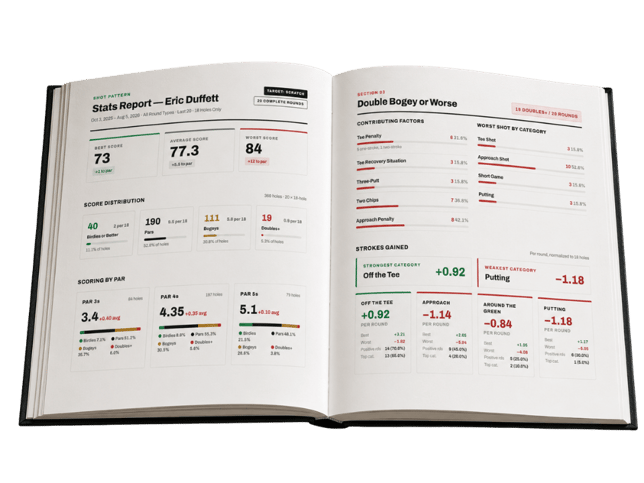 The report is incredibly detailed and gives you tremendous data about your game. If you’ve been tracking every round in Shot Pattern, you’re going to be excited by this reward! If you haven’t started tracking your rounds yet and want a sneak peak at all the report has to offer, you can see an example report below: [](https://shotpattern.app/hs/cta/wi/redirect?encryptedPayload=AVxigLKLNi%2BUHSszuJU2xZ%2BbHcz79axwBTt9dIMhE3B0lA0PU%2FqfHsG1J2SGX4EksM7hmmdmx0120JS7CIPGhNnHhEe8AvNqiToYKCK0cUKnHZ0dzYdgEBVX%2BCHTUlRtNLjYbH1AXdDI6%2FQjEMmOO2JTVLT8lNRVCMXfXmb8NMh6CdIA7yMrNIRtQDD7bVT9H1dM7XsrjgMZU%2FtvLigoOChSGD742A%3D%3D&webInteractiveContentId=378692965075&portalId=51325885) --- ## **Building Your Golf Improvement Plan with AI** I’m using AI all the time for building Shot Pattern, business, and several other life tasks. However, I’ve always found that it struggled to really nail the output when it came to giving more than generic golf advice. With the advances in AI, and the detail in this report, that’s no longer the case. I think most golfers can get tremendous guidance from AI, but there are a few critical details to be aware of in order to make sure you’re getting accurate, trustworthy responses. ### **1. Upload the most detailed data you have.** A generic dashboard with fairways, greens, and putts doesn’t provide near enough detail. You’ll get absolutely nothing of use if those are the only stats you have. Even screenshots with the “Big 4” strokes gained categories or your “Tiger 5” score killers don't dig deep enough to get to the “why” behind the “what”. This is where the new PDF report takes things to the next level. There’s more data here than most people care to parse through. However, it’s this kind of data that the AI tools thrive upon and can help you make sense of. *Pro tip: The report pulls from the filters you have set before you hit the export button. I suggest toggling to your “Last 20” rounds. I also set my report to 18-hole rounds only.* ### **2. Benchmarks are crucial for context** “Help me get to scratch” means absolutely nothing unless the AI tool has context as to how a scratch golfer performs. Even telling the LLM to “Act like an expert golf coach” isn’t near enough guidance to make sure it has the context it needs to provide good recommendations. You need real data. Your Shot Pattern report contains benchmarks on driving distance, accuracy, approach performance, short game proximity, putting make rates, and more. Without these benchmarks, AI is mostly guessing how far you are from where you need to be. ### **3. Ask for prioritization, not “tips”** A great prompt would say: *“Identify my three highest-leverage opportunities. Show me the data supporting each one, separate skill problems from strategy problems, and give me a practice and on-course plan.”* That skill-versus-strategy distinction is huge. Shot Pattern can even identify shots that were inside a player's normal dispersion but still found a penalty—suggesting the problem may have been aim or club selection, not execution. ### **4. Make the tool state its confidence** Tell it: *“Don't guess. Cite the stats you're relying on, consider sample size, distinguish facts from inferences, and tell me when the data isn't sufficient.”* That's one of the easiest ways to make an AI-generated improvement plan more trustworthy. Stats can tell me that putting or approach play needs work; they generally cannot, by themselves, tell me what mechanical swing flaw caused it. ### **5. Use a powerful model** I used ChatGPT 5.6-Sol cranked up to Pro to get what I considered terrific output. I’d encourage you to use a powerful model to get the best output. This isn't because the arithmetic is difficult; it's because you want the model to connect dozens of statistics, weigh sample sizes, distinguish correlation from likely causes, and prioritize competing opportunities. A quick-response mode is fine for “summarize my stats.” For “build me the best plan to lower my handicap,” give it more reasoning time. --- Those are the keys! In working with golfers the biggest mistakes I’ve seen have been relative to #’s 1 and 2. You have to have great data, and you have to provide the right benchmarks. I’m really excited by the possibilities here. Expect more from Shot Pattern in this direction soon. Have you been using AI with your Shot Pattern stats to help improve your game? I’d love to hear what you’re doing and how you’re using different AI tools! ## Frequently Asked Questions Can AI really help me improve at golf? AI can provide highly specific, data-driven improvement recommendations when given detailed performance data. Generic advice from AI tends to be unhelpful because it lacks context about your actual game. However, when you upload a comprehensive stats report that includes strokes gained breakdowns, dispersion data, and scoring benchmarks, AI tools can identify your highest leverage opportunities, distinguish between skill problems and strategy problems, and build a prioritized practice plan tailored to your game. What golf stats do I need to get useful advice from AI? A generic dashboard with fairways, greens, and putts doesn't provide near enough detail for AI to give you anything useful. Even screenshots showing your strokes gained categories or score killers don't dig deep enough to get to the "why" behind the "what." You need the kind of granular, structured data that AI tools thrive on. Shot Pattern's new PDF stats report provides that level of detail, giving AI the raw material to identify real patterns and build actionable recommendations. How do I use Shot Pattern's stats report with ChatGPT or other AI tools? Export your Shot Pattern stats as a PDF report, then upload it directly to your preferred AI tool. Before exporting, set your filters to your most recent 20 rounds and toggle to 18 hole rounds only for the most relevant data. Once uploaded, ask the AI to identify your three highest leverage opportunities, show the data supporting each one, separate skill problems from strategy problems, and give you both a practice plan and an on course plan. Tell it not to guess, to cite the stats it's relying on, consider sample size, distinguish facts from inferences, and tell you when the data isn't sufficient. Why do golf benchmarks matter when using AI for improvement? Without benchmarks, AI has no way to evaluate how far you are from where you need to be. Telling an AI tool to "help me get to scratch" means nothing unless the model has context for how a scratch golfer actually performs. Your Shot Pattern report contains benchmarks on driving distance, accuracy, approach performance, short game proximity, putting make rates, and more. These benchmarks give the AI the reference points it needs to measure the gap between your current game and your goal, then prioritize accordingly. What is the best AI model to use for golf game analysis? For a simple summary of your stats, most AI models will work fine. For building a comprehensive improvement plan, use a powerful model and give it more reasoning time. The analysis requires connecting dozens of statistics, weighing sample sizes, distinguishing correlation from likely causes, and prioritizing competing opportunities. A quick response mode is fine for "summarize my stats." For "build me the best plan to lower my handicap," you want the model doing its deepest reasoning. Can AI tell me what's wrong with my golf swing from stats alone? Not reliably. Stats can tell you that a particular area of your game needs work, but they generally cannot, by themselves, tell you what mechanical swing flaw is causing the problem. AI is excellent at identifying the "what" and the "where" in your data. The "why" behind it typically requires additional context beyond what stats alone can provide. ## Share this post